 HPD Admin Tools
 HPD Admin Tools
Menu | Edit > Add > Product Group |
Tool |
|
Add product groups to user groups.
Related commands:
• |
Procedure
1. Select the Add Product Group command.
A new product group is added to the Product Groups layer.
2. In the Properties window, type a name for the group.
The product group is listed by that name.
The product group must now be copied to a user group.
Within the user group there are two product groups: read/write and read-only.
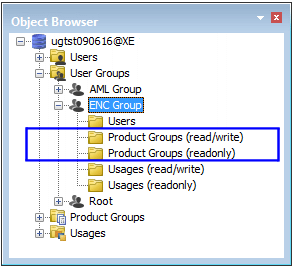
3. Select the new layer in Product Groups folder.
4. Drag the product group to a Product Group folder in a user group.
