 Admin Tools
 Admin Tools
Menu | Edit > Add > Transition to Procedure |
Tool |
|
Pop-up | Add Transition to Procedure |
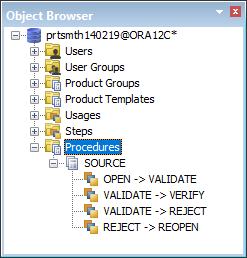
Add transitions between project steps. Transitions are shown under the Procedures layer in Object Browser.
Related commands:
• | • |
Procedure
1. Select the procedure in Object Browser to which the transition is associated.
2. Select the Add Transitions command.
A New Transition sub-layer is added under the selected procedure layer.
3. Complete the following attributes in the Properties window.
Attribute | Descriptions |
|---|---|
Note | Information about the transition |
Assigned Roles | User role that is assigned to the transition. More than one role can be added. Select a role from the list. |
Current Step | First step in the transition. The step is displayed in Object Browser. Select the step from the list. |
Next Step | Second step in the transition. The step is displayed in the Object Browser. Select the step from the list. |
