 CARIS HPD Source Editor
 CARIS HPD Source Editor
Menu | Usages > Assign Representations > Superselection Usages > Assign Representations > Selection |
Pop-up | Assign Representations > Superselection Assign Representations > Selection (Selection window) |
Assign representations of features to one or more usages. An instance of the feature is placed on the new usage. This represents the feature at a different scale than the base usage.
For further information about usages, refer to the Usage Manager section in Database Administration. |
Press <Esc> to cancel at any time.
Procedure
1. Select the features to be assigned to a usage.
2. Select the Assign Representations command.
The Add Representation to Usages dialog box is displayed.
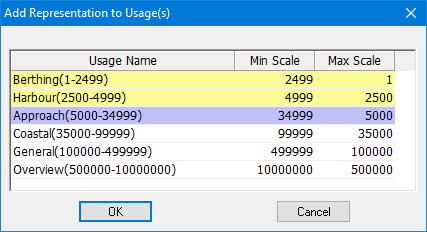
The current usage is highlighted in purple. Higher scale usages are highlighted in yellow.
3. Select one or more usages using click and <Ctrl+click>.
4. Click OK.
The representation is assigned to the selected usage.
Representations are typically assigned to usages with a smaller scale than the base usage. If you try to add a representation to a larger scale usage, you are prompted to confirm.
The representations on the new usages are assigned a representation status of Under Construction and must be verified before products can be created from the usages.