 CARIS HPD Product Editor
 CARIS HPD Product Editor
CARIS S-57 Composer
Features in S-57 and S-100 datasets can be processed. |
Menu | Edit > Change > Scale Minimum Values |
Set the minimum display scale for features that are not covered by meta objects that define compilation scale.
The minimum display scale is calculated using the scale factor method or the step method (from the S-57 Use of the Object Catalogue (UOC) standard). Soundings are calculated separately from non-sounding features (areas, lines or points).
The scale minimum is represented by SCAMIN attributes in S-57 datasets and by scaleMinimum attributes in S-101 datasets. |
The following minimum scale value support files are included.
File | Description |
|---|---|
assignscamin.xml | Mapping file that applies scale factors to calculate the minimum scale values for area, line, and point features. |
assignIHOscamin.xml | Mapping file that assigns minimum scale values to S-57 area, line and point features based on S-57 Use of the Object Catalogue (UOC), Ed. 4.0.0 June 2014. |
sdgparm.txt | Text file that contains scale factors used to calculate minimum scale values for soundings. |
assignEUIENCSCAMIN.xml | Mapping file that applies a scale value based on the IENC Encoding Guide 1.3.1 for European IENC. |
assignUSIENCSCAMIN.xml | Mapping file that applies a scale value based on the IENC Encoding Guide 1.3.1 for US IENC. |
assignBalticSCAMIN.xml | Mapping file that applies a scale value based on S-65. |
You can modify these files or create your own custom files using the same structure and syntax as the original files.
Interface
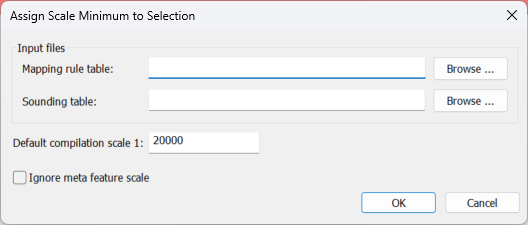
Option | Description |
|---|---|
Mapping rule table | Assign minimum scale values for non-sounding features. Click Browse and select the file. |
Sounding table | Assign minimum scale values to soundings. Click Browse and select the file. |
Default compilation scale | Assign a compilation scale, or use the default map or product scale that is shown. Some maps may not have a scale, in which case this field is empty. |
Ignore meta feature scale | Ignore the compilation scale attributes of meta objects when determining the scale minimum, and use the Default compilation scale value instead. |
Procedure
1. Select the layer.
For a product, this is the All Data or Product Specific layer. For a project, it must be an editable layer.
2. Select the features to be processed.
The selection can contain sounding features, non-sounding features, or a mixture of both.
3. Select the Assign Scale Minimum Values command.
The Assign Scale Minimum to Selection dialog box is displayed.
4. Select the Mapping rule table.
5. Select the Sounding table.
6. Enter a new Default compilation scale, or use the default.
7. Select the Ignore meta feature scale option if desired.
8. Click OK.
The minimum scale values are calculated for the selected features using the scale factors from the selected files . The results are displayed in the Output window.