 CARIS HPD Publications Module
 CARIS HPD Publications Module
Menu | Certify > Submit |
Tool |
|
Pop-up | Submit (Object Browser) |
Menu | Certify > Accept |
Tool |
|
Pop-up | Accept (Object Browser) |
Menu | Certify > Verify |
Tool |
|
Pop-up | Verify (Object Browser) |
Menu | Certify > Reject |
Tool |
|
Pop-up | Reject (Object Browser) |
Publications Module uses certification to track quality. Access to the certification commands are determined by user roles.
Certification can be applied to
• notices
• instructions
• light records
• publication sections
Every item is assigned one of the status values shown in the following table.
Status | Description |
|---|---|
Under Construction | Assigned to all new notices or records. This status is applied whenever any information is edited |
Not Verified | Assigned after editing is complete and the notice or record is submitted for verification. |
Accepted | Assigned when a notice is known to be acceptable (this step is optional) |
Verified | Assigned when a notice is complete and correct and is ready for a publication |
Rejected | Assigned when a notice is unacceptable (incomplete or incorrect). Rejected notices must be reprocessed and re-submitted for verification (status reset to Not Verified, Accepted, or Verified) |
This diagram shows the typical workflow for certifying notices.
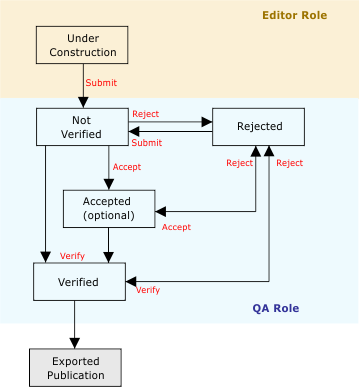
If a change is made to a notice, it is automatically re-assigned to Under Construction regardless of the previous certification status. |
The certification process in Publications Module allows for certification settings:
• A Verified notice can set to Rejected.
• A Rejected notice can be reset to Not Verified or Accepted.
• A Rejected notice can also be directly reset to Verified.
Related commands
• |
Procedure
1. Select the notice, record or publication section.
2. Select a certification command.
The status of the object is changed to selected option.


