 CARIS HPD Paper Chart Editor
 CARIS HPD Paper Chart Editor
Menu | Tools > Compare Panel to Source |
Compare features in a panel of an open database chart to equivalent features in source. Changes are listed in Layers window.
Source features must have a verified status.
Any of the following changes can be included:
Change | Description |
|---|---|
Updated | Existing features that have modified geometry or changed attributes. or that were superseded by new features. |
Deleted | Features that were deleted from the source. |
New | New features added to the source |
Removed by Filter | Features that were in a panel that was created from a filtered layer but are now excluded because changes in source puts the features outside filter parameters. |
Markers | Notice markers in source with an Accepted status are listed for information purposes only. |
Only the source usage from which the panel was made is considered. In addition, if a source feature was modified more than once then only the most recent verified version is used.
Changes in source can be applied to the panel using the Apply Updates command.
Annotations that were added to the product will remain with the feature even if the source feature has moved.
You can assign colours to features using Set Override Colour in the Properties window. For example, all features in the New layer could be shown in green and features in the Deleted layer shown in red.
Related commands:
• • |
Procedure
1. Select the Panel data layer.
2. Select the Compare Panel to Source command.
New layers are created to show changes.
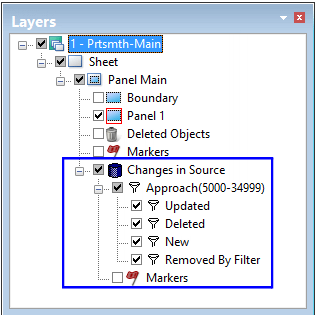
3. Select a Changes in Source child layer.
4. Select the appropriate features.
5. To apply the changes, select the Apply Changes to Panel command.
The selected features are applied to the panel.
Allow specific updates
The command can be modified to list only changes to specific features in a chart. This is done using the ALLOWSPECIFICCPSUPDATE server API procedure. For example, to view changes to an UWTROC (underwater rock) feature, the procedure can be set to only list changes to UWTROC features.
The Changes in Source layer is displayed in the Layers window.
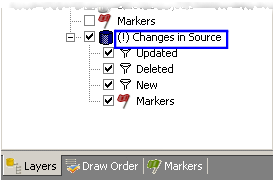
If an exclamation mark (!) is displayed in the Changes in Source layer, it indicates that only the features specified in the procedure are included in the layers.