 CARIS HPD Paper Chart Editor
 CARIS HPD Paper Chart Editor
CARIS HPD Product Editor
CARIS HPD Source Editor
Option | General > Connection |
Define proxy settings that let you reach external URLs if the application is behind a firewall.
Interface
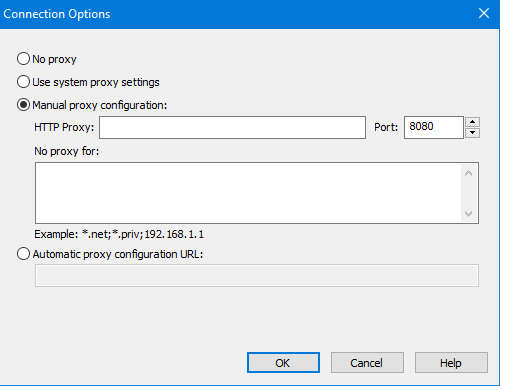
Option | Description |
|---|---|
No proxy | No proxy setting is required because the application is not on a network computer behind a firewall. |
Use system proxy settings | Use the proxy server settings defined for the operating system. These are defined in the Control Panel under the Local Area Network (LAN) settings |
Manual proxy configuration | Manually define proxy settings. • HTTP Proxy: The name of the network computer acting as the proxy server. • Port: The port number on the server computer being used to send and receive information. Select a value using the arrows or type it manually into the field • No proxy for: Specify connections that do not require a proxy server but might trigger the firewall. The exceptions are entered as a list of comma separated patterns. |
Automatic proxy configuration | Specify the location of a Proxy Automatic Configuration (PAC) file on the network. A PAC file is a JavaScript function which contains network IP addresses and predefined settings for the proxy server and port. |
Procedure
1. Select the Options command.
Menu | Tools > Options |
2. Select the General tab.
3. In the Connection option, click ... (browse).
The Connection Options dialog box is displayed.
4. Set any necessary options.
5. Click OK.
You are returned to the Options dialog box.
6. Click OK.