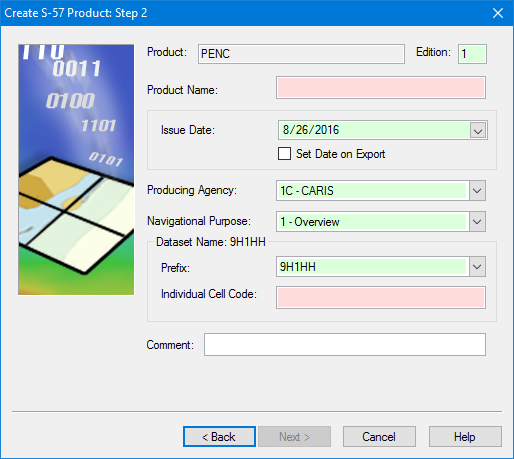
Port ENC (PENC) is not included by default. You must add a Generic S-57 section to the product information file before you can use this. See Support Files for details. |
Essential PENC product information.
Interface
Option | Description |
|---|---|
Product | [Read only] The product type selected in the previous step. |
Edition | The start number for editions. This defaults to 1. Change this if necessary by typing a new number in the box. |
Product Name | The name for the product. Type in the box. |
Issue Date | • Issue Date: The date for the product. Select a date by clicking the down arrow to display a calendar. • Set date on export: • On: Apply the export date to the product. The Issue Date field is inactive. • Off: Apply the date in the Issue Date field. |
Producing Agency | A two-digit code indicating the country of origin. Select from the list. |
Navigational Purpose | The scale range, or usage, of the product. Select from the list. |
Dataset Name | The name of the dataset is a combination of the options inside the Dataset Name frame. The name is displayed in the frame title as you select the options. • Prefix: Text placed at the beginning of the dataset name. Select from the list. • Individual Cell Code: A unique five-character code that identifies the base cell. |
Comment | Other information. Type in the box. |
Procedure
1. Define any necessary options.
2. Click Next.