 CARIS HPD Paper Chart Editor
 CARIS HPD Paper Chart Editor
CARIS Paper Chart Composer
Menu | Create > Scale Bar > [Scale Bar Style] |
Pop-up | Create Scale Bar > [Scale Bar Style] (Layers window) |
Add a scale bar to a panel.
Scale bars are defined in Template Editor. The anchor point is the bottom-centre of the scale bar when inserted into a panel.
Related commands:
• • • • | • • • |
Interface
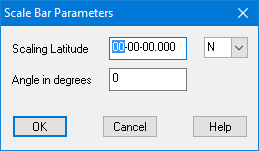
Option | Description |
|---|---|
Scaling Latitude | Scaling Latitude specifies the latitude at which the scale bar is correct. Panels may be distorted differently at various latitudes; therefore, you need to determine the latitude at which the scale bar is most accurate. 1. Type a latitude value. 2. From the Scaling Latitude drop-down list select N (North) or S (South) |
Angle in degrees | [Optional] To rotate the scale bar, type a value for Angle in degrees. |
Procedure
1. In the Layers window, select a Panel data layer.
2. Select the Create Scale Bar command and select a scale bar style.
The Scale Bar Parameters dialog box is displayed.
3. Type any required parameters and click OK.
The scale bar cursor is displayed ( ).
).
4. Position the cursor at the location where the scale bar is to be placed.
5. Click the mouse.
The scale bar is displayed at the location where you clicked the mouse.