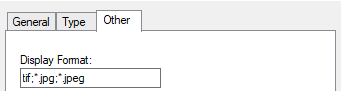
Other image object formats can be defined for the PICREP attribute in the HPD.
1. In the Select Editor View list, select Attribute.
• The list of the acronyms available is displayed.
2. From the Acronym list, select PICREP.
• In the Acronym field of the General tab, PICREP is displayed.
3. Select the Other tab.
• The fields for the Other tab are displayed.
The default format, TIF, is displayed without any additional characters or punctuation. Each format added after the first (default) format must include a ";*." (semi-colon, asterisk, period) prefix followed by the characters for the extension of the format being added.
4. In the Display Format field, type each format to be included.
5. To finish updating the dictionary, click Apply.
6. To commit these changes to the database, select Commit.
• A commit completed message is displayed.
7. To close the message, click OK.
8. Close the HPD Dictionary Editor; select Exit.
• The HPD Dictionary Editor is closed and the Administration Tools window is redrawn.
9. To close the Administration Tools window, click Exit.