 CARIS HPD Product Editor
 CARIS HPD Product Editor
CARIS HPD Source Editor
CARIS S-57 Composer
CARIS Paper Chart Composer
Menu | View > Display Window Properties |
Set properties for the active Display window. These override the default properties set using the Options command. Other Display windows can have different settings.
Related commands:
• |
Interface
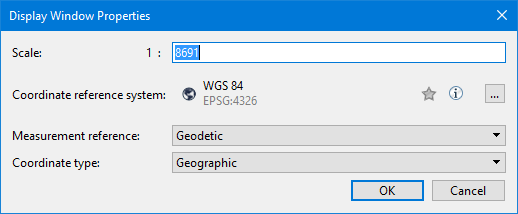
Option | Description |
|---|---|
Scale | Change the view in the selected Display window to a specific scale. 1. Type the scale denominator in the box. |
Coordinate reference system | Set the coordinate reference system for the selected Display window. This has the following command buttons: • • • Hover over the button to see a pop-up description. • Click to display the Coordinate Reference System dialog box. • See Select Coordinate Reference System for details. |
Measurement reference | Select the reference system used for distances, angles and areas in the Display. This setting is displayed in and can be changed in the Status bar. Choose from: • • If the view is not georeferenced, N/A is displayed for areas, distances and angles. Areas are computed using a localized Albers equal area projection; lengths are computed using Vincenty's algorithm. • |
Coordinate type | Available coordinate types depend on the active coordinate reference system.. Coordinate types can be: • • |
Procedure
1. Select the Display window you want to use.
2. Select the Display Window Properties command.
3. Set any necessary properties.
4. Click OK.


