 CARIS HPD Product Editor
 CARIS HPD Product Editor
CARIS HPD Source Editor
CARIS HPD Paper Chart Editor
CARIS S-57 Composer
CARIS Paper Chart Composer
Menu | File > Export > Selection > Shapefile |
Export a selection of features to a Shapefile, extension .shp.
Each feature acronym is exported to a separate file.
Related commands:
• • • • | • • • |
Interface
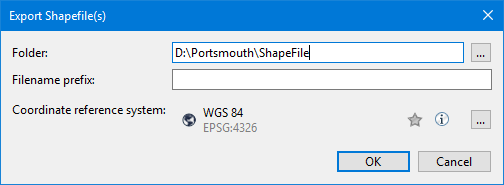
Option | Description |
|---|---|
Folder | The location for the exported files. |
Filename prefix | A prefix for the names of the exported files. Individual files are assigned names based on the acronyms and feature types. The prefix is used to identify the individual files as part of the same export operation. Type a meaningful prefix. |
Coordinate reference system | The coordinate reference system of the selected data. If you hover over the entry, the favourites and information icons are displayed.
Click browse (...) to select a different coordinate reference system. See the Select Coordinate Reference System command for details. |
Procedure
1. Select the features to be exported.
2. Select the Export Selection to Shapefile command.
The Export Shapefile dialog box is displayed.
3. Select a folder and file name prefix.
4. If necessary, change the coordinate reference system.
5. Click OK.
The selected features are exported.
 If the icon is yellow, the coordinate reference system is a favourite. You can add or remove it from the favourites list by clicking the icon.
 Display information about the coordinate reference system.