 CARIS HPD Paper Chart Editor
 CARIS HPD Paper Chart Editor
CARIS Paper Chart Composer
Menu | Edit > Masking > Mask Automatic |
Tool |
|
Pop-up | Mask > Automatic (Layers window) |
Apply masking to all line features that intersect point, sounding, or text features. If the panel or chart is set to INT1-v2.0, this command overrides dynamic masking.
Related commands:
• | • |
Interface
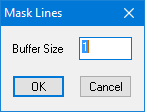
Option | Description |
|---|---|
Buffer Size | The size of the buffer around masked features in the panel. |
Procedure
1. Select the Panel data layer.
2. Select the Mask Lines Automatically command.
The Mask Lines dialog box is displayed.
3. Type a Buffer Size.
4. Click OK.
Feature masks are created for all point, sounding, and text features on the panel.
