Lookup tables define symbology for INT1, S-52 and VPF portrayals. They are in text format and have the extension .dic.
Below is a list of lookup tables available for each of the presentation types. These files are found in the following locations:
C:\Program Files\CARIS\HPD\<version>\system\PCEConfig\lookup
C:\Program Files\CARIS\HPD\<version>\system\S57Config\symbolization\lookup
Portrayal | Lookup Tables |
|---|---|
S-52 Simplified | • areas: • lines: • points: |
S-52 Traditional | • areas: • lines: • points: |
IENC Simplified | • areas: • lines: • points: |
IENC Traditional | • areas: • lines: • points: |
IENC Simplified-Brazil | • areas: • lines: • points: |
IENC Traditional-Brazil | • areas: • lines: • points: |
IENC Simplified-Paraguay-Parana Waterway | • areas: • lines: • points: |
IENC Traditional-Paraguay-Parana Waterway | • areas: • lines: • points: |
VPF | • areas: • lines: • points: |
INT1 | • areas: • lines: • points: • text: |
INT1 Vector Dynamic Masking | • areas: • lines: • points: • text: |
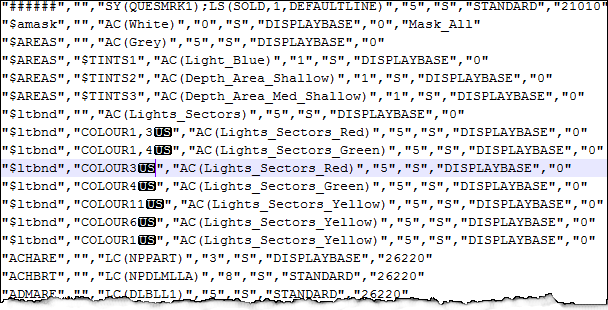
An example from the asymrefs.dic file for the INT1 presentation is shown below:
All lookup tables contain non-printing unit separator characters. These cannot be removed without corrupting the table. Lookup tables should be modified in a text editor that can display non-printing characters. |
All lookup file entries use the same structure: a row starting with a feature acronym followed by six other fields. Each field is separated by a comma and enclosed in quotation marks.
The first four fields are responsible for displaying data.
The following two examples are entries in the asymrefs.dic lookup tables for LNDRGN (land region) features for S-57 and INT1 respectively.
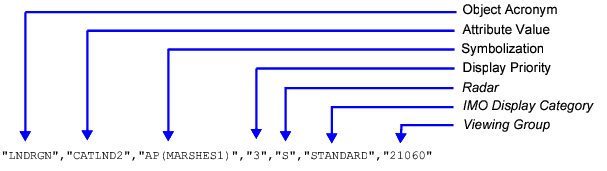
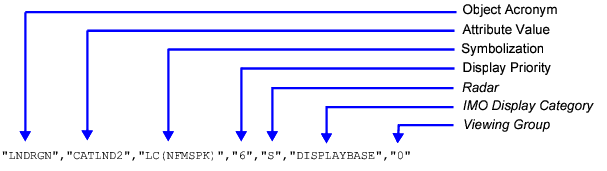
Features are drawn in the Display window by matching feature type to the appropriate lookup table. For example, an area feature is in the asymrefs.dic file.
The following sections describe how HPD reads the four fields for display.
Object Acronym
The Object Acronym field has the following characteristics:
• Six-character object acronym
• Features are listed in alphabetical order
• All entries for a single feature code are grouped together
• Specific entries are listed before more general entries
• If no feature acronym is found, the first entry is used to draw the feature.
Attribute Value
The Attribute Value field has the following characteristics:
• Six-character attribute acronym
• Attributes use the format <attribute_acronym><value><separator>.
For example, for "FUNCTN15", FUNCTN is the attribute and 15 is the value.
• If an attribute is defined, the object must contain the attribute
• If no value is specified, the feature must have a defined attribute, but the value can be anything except UNKOWN
• If a value is specified, the feature must have the attribute defined along with the value
• If an attribute value is marked ?, the value is set to UNKNOWN
• Matching attribute values may be integer, float or string type
• The symbolization code ($SCODE) can be applied as an attribute to a cartographic feature. For example,$CSYMB","$SCODENPMLPA","SY(NPMLPA)","4","S","STANDARD","12345"where $SCODE is the attribute and NPMLPA is the value.
• Specific attribute entries are listed before more general entries
When a lookup table has been selected, HPD locates the acronym and attributes corresponding to the feature. This means that the entry in the lookup table whose attributes matches the feature are chosen. If there is more than one entry for an acronym, the first match is used.
For example, if an ACHARE (Anchorage area) feature contains a Category of Anchorage (CATACH) attribute of 2, the third entry for the ACHARE feature acronym, CATACH2, is used.
If the ACHARE feature contains no attribute values or contains attribute values that are not listed in the lookup table, the first entry is used.
"ACHARE","","LC(NPPART)","3","S","DISPLAYBASE","26220" |
"ACHARE","CATACH1OBJNAM","LC(NPPART);SY(NPAN)","3","S","DISPLAYBASE","26220" |
"ACHARE","CATACH2","LC(NPPART);SY(DLAN)","3","S","DISPLAYBASE","26220" |
"ACHARE","CATACH3","LC(NPPART);SY(DLAN)","3","S","DISPLAYBASE","26220" |
"ACHARE","CATACH4","LC(NPANSY);SY(DLAN);SY(IN12)","3","S","DISPLAYBASE","26220" |
"ACHARE","CATACH5","LC(NPPART);SY(DLAN);SY(NPALHO)","3","S","DISPLAYBASE","26220" |
"ACHARE","CATACH9","LC(NPPART);SY(DLAN)","3","S","DISPLAYBASE","26220" |
"ACHARE","STATUS6","LC(NPPART);SY(DLAN)","3","S","DISPLAYBASE","26220" |
In this example, a sounding feature code is not specified:
"SOUNDG","","CS(SOUNDG02)","6","O","OTHER","33010" |
You can add the SGSL1 sounding feature code to the entry:
"SOUNDG","","CS(SOUNDG02,,SGSL1)","6","O","OTHER","33010" |
SGSL1 will then be used for all SOUNDG features.
Symbolization
The Symbolization field has the following characteristics:
• Symbology entries are separated by semi-colons
• Entries are placed in the order given in the lookup table
• Area colour fills are listed before lines or centred symbols
• Features drawn with no specific symbolization use double quotation marks ("").
These are the feature types and relevant symbolization codes.
Symbology Instruction | Comments |
|---|---|
Points | |
CS(SOUNDG02,DEPTH_ATTRIBUTE,FEATURE_CODE) | This code is a call to a conditional symbology procedure, used only for drawing soundings features. Note: DEPTH_ATTRIBUTE and FEATURE_CODE are parameters of the SOUNDG02 procedure. • SOUNDG02: The conditional symbology procedure used to display depth values for point objects. As a procedure call, this parameter is a literal value that must be included in the instruction as SOUNDG02. • DEPTH_ATTRIBUTE: The sounding feature attribute from which the sounding value is retrieved (for example, VALSOU). • FEATURE_CODE: The feature code used (for example, SGSL). |
SY(FEATURE_CODE) | This code is used for drawing a symbol using the specified feature code in the If the feature code does not exist in the master file or in invalid for symbols, a ? character is used instead. |
SY(FEATURE_CODE, ORIENT) | This code is similar to the above, except that it can assign an angular distance measured from true north (north azimuth). This can be the value of the attribute (typically ORIENT) or an explicit number. |
TE, TX (STRING, HJUST,VJUST,SPACE, CHARS,XOFFS,YOFFS, COLOUR,DISPLAY) | The The
• 1 - centre • 2 - right • 3 - left (default))
• 1 - bottom (default)\ • 2 - centre • 3 - top
• 1 - fit (characters are expanded or compressed to fit the current field width) • 2 - standard ( • 3 - standard with word wrap (
• Defines style (font), weight, width (straight, italic), and text character size. • Style: 1 - plain, sans serif font (recommended) • Weight: 4 - light, 5 - medium (default), 6 - bold • Width: 1 - upright (non-italic, recommended); for ENC • Body Size: 10 - upper-case character height (measured in pica points; 10 pica (default) = 3.51 mm; this is the minimum size).
• 0 (default value): undefined • + (value greater than zero): right offset • - (value less than zero): left offset Note: offset = value * Body Size
• 0 (default value): undefined • + (value greater than zero): downward offset • - (value less than zero): upward offset Note: offset = value * Body Size
|
Lines | |
CS (quapos00, LC (FEATURE_CODE), LC (FEATURE_CODE) | Conditional symbology procedure to draw COALNE and DEPCNT line features. The quapos00 code is an instruction to draw the COALNE or DEPCNT according to the QUAPOS (Quality of Position) spatial attribute value. The first FEATURE_CODE draws COALNE and DEPCNT features with QUAPOS values of 1, 10, 11 (good, undefined, unknown) as a solid line. The second FEATURE_CODE draws COALNE and DEPCNT features with QUAPOS values of 2, 3, 4, 5, 6, 7, 8 (poor) as dashed lines. |
LC(FEATURE_CODE) | This code draws a complex line using the feature code specified in the Line ends are drawn as rectangular or rounded, according to the feature code in If the If the feature code does not exist in the master file or in invalid for symbols, a The LC code is the preferred code for line drawing. |
LS(SOLD, 1, COLOUR_TOKEN) | This code draws a line. The first parameter can be The second parameter is the width of the line (in pixels). The third parameter is the colour token. If the The default line end is rectangular. |
LC(FEATURE_CODE) | This code draws a line using a feature code specified in LIN ( If the |
LS(SOLD, 1, COLOUR_TOKEN) | This code draws a line. The first parameter can be The second parameter is the width of the line (in pixels). The third parameter is the colour token. The default line end is rounded. |
SY(FEATURE_CODE, ORIENT) | This code is used for drawing a symbol in the middle of a line. This is the same code as used for point symbolization. See the Points section for more information. |
Areas | |
AC(COLOUR_TOKEN) | This code specifies the colour token name from |
AC(COLOUR_TOKEN, TRANSPARENCY_VALUE) | The second parameter is used to define transparency (1=25%, 2=50%, 3=75%). |
AH(COLOUR_TOKEN, STYLE,THICKNESS, SPACING) | The • • • • • • The default value is The third parameter sets the thickness of the hatch lines. The default value is 0.01 mm. The fourth parameter sets the spacing between the hatch lines. The default value is 1.0 mm. |
AP(PATTERN_FILL) | The |
LC(FEATURE_CODE) | For definitions, see the Lines type section. |
LS(SOLD,1, COLOUR_TOKEN) | For definitions, see the Lines type section. |
SY(FEATURE_CODE, ORIENT) | For definitions, see the Points type section. |
Text | |
TB(FILL_COLOUR, OUTLINE_COLOUR, OUTLINE_WIDTH, MARGIN_RIGHT_MM, MARGIN_LEFT_MM, MARGIN_TOP_MM, MARGIN_BOTTOM_MM) | Draw a text box around the text feature. • • • • • • |
TC (COLOUR_TOKEN) | Display text in a specific colour. |
TH(COLOUR,WIDTH_MM | Draw a halo around each character of the text feature. The first parameter is the colour token. The second parameter is the width of the halo line around each text character. The halos are drawn underneath the characters of the text. |
TS(SYMBOL_NAME, SIZE_MM,OFFSETS_X_MM,OFFSETS_Y_MM,ANGLE) | Draw a symbol behind the text feature. • • • • • |
Display Priority
Display Priority is a numerical value that controls the drawing order of features. Features with a priority of 1 are drawn first, then features with higher values are drawn on top. You can override the default priority levels set in this file using the $prior attribute.