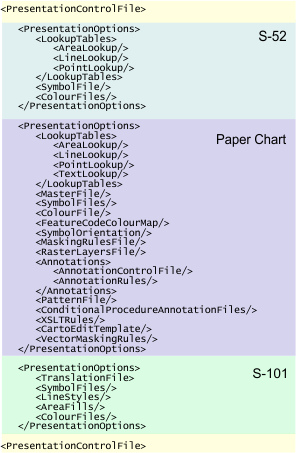
The Portrayal Control File links portrayals to files required for presentation. These files include lookup tables (line, area or point), symbol files, and colour tables.
The default file (portrayalcontrol.xml) is located in C:\Program Files\CARIS\HPD\<version>\system.
The structure of the control file is shown here:
This table describes the tags in the file:
Tag | Description |
|---|---|
<PresentationControlFile> | Root tag for all tags and elements in the file. Attributes:
|
<PresentationOptions> | Parent tag for a specific portrayal. Type: S-52, INT1, S-101 Attributes:
|
<LookupTables> | Parent tag for the lookup tables for areas, lines, points, and where necessary, text. Type: S-52, INT1, |
<AreaLookup/> | The file that controls symbology, colour and other display properties of area features. This tag is a child tag of Type: S-52, INT1 Attributes:
|
<LineLookup/> | The file that controls the symbology, colour and other display properties of line features. This tag is a child tag of Type: S-52, INT1 Attributes:
|
<PointLookup/> | The file that controls the symbology, colour and other display properties of line features. This is a child tag of Type: S-52, INT1 Attributes:
|
<TextLookup/> | The file that controls text properties in INT1 charts. This is a child tag of Type: INT1 Attributes:
|
<SymbolFiles/> | Folder containing symbol files for S-52 features. Type: S-52 Attributes:
|
<SymbolFile/> | Name of the binary file containing INT1 symbols for paper charts. Type: INT1 Attributes:
|
<ColourFiles/> | Folder containing colour tables based on ECDIS display modes. Each file contains colour tokens for displaying features. Type: S-52 Attributes:
|
<ColourFile/> | The path for the file containing colour tokens for INT1 display in paper charts. Type: INT1 Attributes:
|
<FeatureCodeColourMapFile/> | The colour table associates symbolization codes in the Type: INT1 Attributes:
|
<SymbolOrientation> | Flag to set all symbols and soundings to North up. This tag is normally commented out. See below. <SymbolOrientation>NorthUp</SymbolOrientation> |
<MaskingRulesFile/> | The Masking Rules File contains rules for dynamic and priority masking. Type: INT1 Attributes:
|
<RasterLayersFile/> | The Raster Layers file controls what raster layers are drawn in a panel and the draw order those layers. It also controls how dynamic masking is applied. Type: INT1 Attributes:
|
<Annotations> | Parent tag for annotation tags Type: INT1 |
<AnnotationControlFile/> | The Annotation Control File lists all files that are responsible for displaying annotations in a chart. Type: INT1 Attributes:
|
<AnnotationRules> | |
<MasterFile/> | A text file that contains CARIS symbolization codes. Type: INT1 Attributes:
|
<PatternFile/> | The pattern definition file for adding fill patterns to area features. Type: INT1 Attributes:
|
<ConditionalProcedureAnnotationFiles/> | Folder that contains conditional symbology instructions. Type: INT1 Attributes:
|
<XSLTRules/> | The files that are responsible for dynamic cartography This tag is normally inactive. To make it active, remove the comment tags. Type: INT1 Attributes:
|
<CartoEditTemplate/> | File that contains templates for dynamic cartography. Type: INT1 (dynamic cartography and vector masking) Attributes:
|
<VectorMaskingRulesFile/> | File containing rules for vector masking Type: INT1 (dynamic cartography and vector masking) Attributes:
|
<InputICCProfile/> | International Colour Consortium profile for encoding colours in charts. Note: This tag is not included in the default portrayal file and must be added manually. Type: INT1 Attributes:
|
<CompositeSymbolSet> | Locations of multiple symbol files. Note: This tag is not included in the default portrayal file and must be added manually. Type: INT1 An example is shown below. <CompositeSymbolSet> <SymbolFile File="C:\MyCustomSymbols\ttfComposite.xml"/> </CompositeSymbolSet>
|
<SoundingSymbolization> | Location of the sounding symbolization file. Only required if <SoundingSymbolization> <SymbolFile File="%uslXsymbol_5%" /> </SoundingSymbolization> |
<TranslationFile> | The folder containing the Extensible Stylesheet Transformations (XSLT) files for defining S-101 features. Type: S-101 |
<SymbolFiles/> | Symbols for features. Type: S-101 Attributes:
|
<LineStyles/> | Files for drawing line styles. Type: S-101 Attributes:
|
<AreaFills/> | Files for area fills. Type: S-101 Attributes:
|
<ColourFiles/> | Folder containing colour tables based on ECDIS display modes. Each file contains colour tokens for displaying features. Type: S-52, S-101 Attributes:
|