 CARIS S-57 Composer
 CARIS S-57 Composer
Menu | Tools > Show VPF Validator Errors |
Scan a VPF product using a queue file (.que) to find spatial errors.
The queue file is generated when a VPF database is scanned using the VPF Validator (an Intergraph product). Any errors are saved to the queue file.
The queue file can be used as follows:
• Method 1: Generate a queue file from a VPF database before using it to create a product. After any issues are resolved, export the product and validate the VPF again.
• Method 2: Export the product to a VPF database and then generate a queue file. Apply the file to the product re-export the produce when any issues are resolved.
The workflow for using this command is as follows:
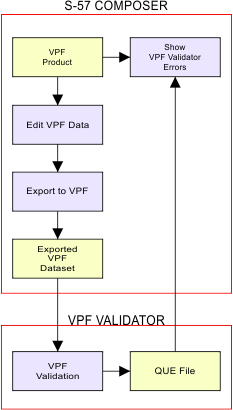
Yellow boxes represent files and blue boxes represent commands that are applied during the process.
Procedure
1. Open a VPF product.
2. Make the product layer or a coverage layer the active layer.
3. Select the Show VPF Validator Errors command.
A File Open dialog box is displayed.
4. Select the queue file and click Open.
Errors in the queue file are matched with features in the open VPF product. Results are displayed in the Validation window.
Links are provided to select the listed features. Once you have modified the features, save the product and export it again.