CARIS HPD Paper Chart Editor
 CARIS HPD Paper Chart Editor
CARIS HPD Product Editor
CARIS HPD Source Editor
CARIS S-57 Composer
CARIS Paper Chart Composer
Menu | Edit > Edges > Simplify/Smooth |
Tool |
|
Simplify and smooth lines with tightly curved or angular edges:
• Simplify: Vertices are removed from the lines if they are not necessary. A number of filtering algorithms are available to simplify lines.
• Smooth: Shortens the distance between vertices by adding more vertices. The shorter edge results in a smoother curve. This is done using the bSpline algorithm.
If you both simplify and smooth, the lines are simplified first and then the simplified lines are smoothed.
While the command is running, a progress bar appears at lower left of the window. You can cancel the operation at any time by pressing the <Esc> key.
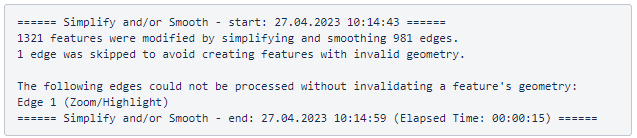
When the operation is complete, the results are shown in the Output window. For each edge that cannot be processed, the Zoom/Highlight hyperlinks allow you to zoom to and highlight the edge for further examination.
Interface
Option | Description |
|---|---|
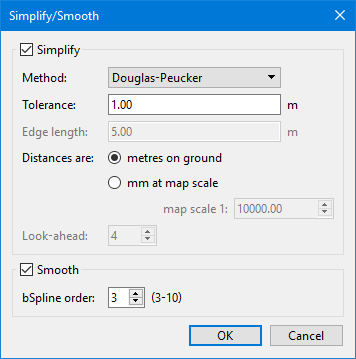
Simplify | Simplify lines by filtering the vertices. • Method: Filtering algorithm. Select from: • Tolerance: Number of units by which to perform filtering. Enter a value in the field. • Edge Length: Maximum edge length when filtering using the Opheim method. This field is only enabled when the Opheim filter method is selected. • Distances are: Distance type to use for filtering. Select either metres on the ground or millimetres at map scale. If you choose millimetres at map scale, a value must be entered in the map scale field. • Look-ahead: Number of vertices to be considered when filtering using the Lang method. |
Smooth | Smooth the lines. • bSpline order: Degree of smoothing you want to apply. The value must be between 3 and 10. |
Procedure
1. Select an editable layer containing line features.
2. Select one or more lines.
3. Select the Simplify/Smooth Lines command.
4. Set any necessary options.
5. Click OK.
The selected lines are simplified, smoothed or both.
6. In the Output window, click the Zoom/Highlight hyperlinks to review any edges that cannot be processed.
Example
Algorithm | Result |
|---|---|
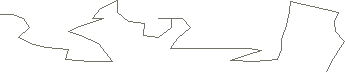
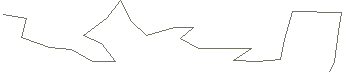
Original line |
|
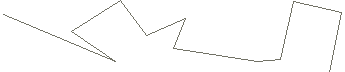
Douglas-Peucker |
|
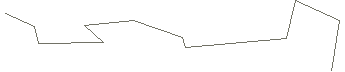
Reumann-Witkam |
|
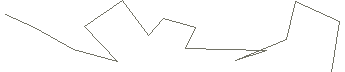
Lang |
|
Radius |
|
Opheim |
|
The Douglas-Peucker algorithm produces a line with higher positional accuracy and less shape distortion than the other algorithms, but it can be time-consuming.
The Lang algorithm and Reumann-Witkam algorithm produce a line with lower positional accuracy than Douglas-Peucker algorithm but higher than the other algorithms.