Edit the properties of an object by adding or removing attributes.
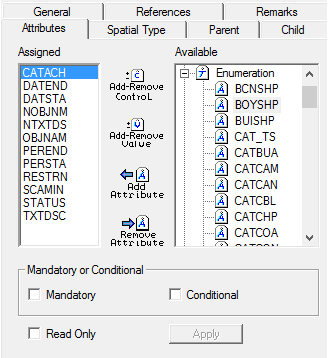
1. Display the Attributes tab.
Option | Description |
|---|---|
Assigned | Attributes associated with an object. |
Available | Attributes that are available for inclusion with an object. |
Mandatory or Conditional | Mandatory: • On: Selected attribute is mandatory. • Off: Selected attribute is optional. Conditional: • On: Selected attribute is conditional. • Off: Selected attribute is not conditional. |
Read Only | On: Attribute values are read-only. Off: Attribute values can be modified. |
Command | Description |
|---|---|
Add-Remove Control
| Controls or class IDs can be set for attributes so that a dialog box is displayed when the attribute is selected in the Attributes window in an HPD editor. 1. Select an attribute in the Assigned list to activate Add-Remove Control. 2. Click Add-Remove Control. The Edit Associated Control dialog box is displayed. 3. Type a value in the field and click OK. You are returned to the main window. |
Add-Remove Value
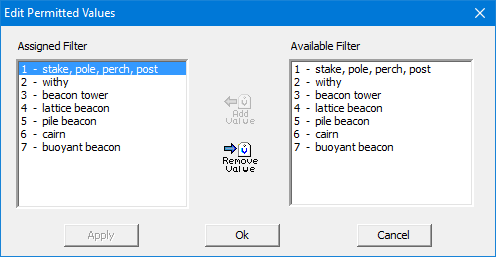
| Edit attributes in the Assigned list that contain enumerated or list values. 1. Select an attribute with enumerated or list values. 2. Click Add-Remove Value. The Edit Permitted Values dialog box is displayed.
The Available Filter contains enumerated or numeric values that belong to the selected attribute. The Assigned Filter list contains the values that will be associated with the attribute. If no values are in the Assigned Filter list, all enumerated values for the attribute will be available for use in the profile. 3. To assign a value, select it in the Available Filter list and click Add Value. The value is moved to the Assigned Filter list. 4. To remove a value, select it in the Assigned Filter list and click Remove Value. The value is moved to the Available Filter list. 5. Click OK. You are returned to the main window. |
Add Attribute
| Assign an attribute to an object. 1. Select the attribute in the Available list. 2. Click Add Attributes. The attribute is moved to the Assigned list. |
Remove Attribute
| Remove an attribute from an object. 1. Select the attribute in the Assigned list. 2. Click Remove Attributes. The attribute is moved to the Available list. |
2. Set any necessary options.
3. Save your changes.