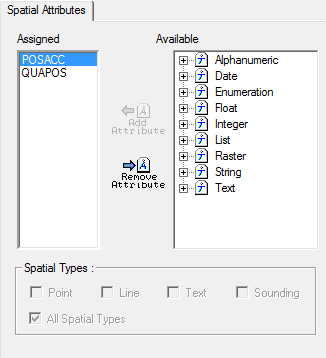
Assign an attribute to a spatial class.
1. Select the Spatial branch in the Attribute Classes data tree.
The Spatial Attributes tab is displayed.
Option | Description |
|---|---|
Assigned | Spatial attributes in the profile, |
Available | All attributes in the profile. |
Spatial Types | Select one or more spatial types: • Point • Line • Text • Sounding • All spatial types. |
Command | Description |
|---|---|
Add Attribute
| Assign an attribute as a spatial class. 1. Expand the Available list. 2. Select an attribute. 3. Click Add Attribute. The attribute is moved to the Assigned list. |
Remove Attribute
| Remove an attribute, 1. Select the attribute in the Assigned list. 2. Click Remove Attribute. The attribute is moved to the Available list. |
A spatial attribute of type text can be populated to a limit of 240 characters. |

