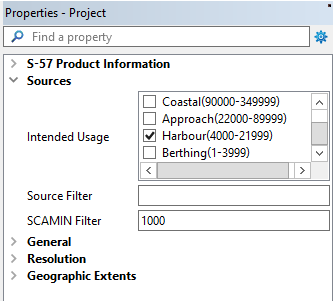
The SCAMIN attribute from Source features can be used to restrict the features that are included in a S-57 or GML vector product in the database.
“SCAMIN Filter” can be found as a property of HPD vector products. When a value is set for the filter, only source features with SCAMIN attributes at the same value or higher are included in a product or chart. The SCAMIN Filter attribute is optional. If no SCAMIN Filter is set, then the filter is ignored.
Procedure
1. Open an existing HPD vector product
2. In the Project window select the Layout layer of the Product and view the Project Properties window
3. Add or Edit the SCAMIN Filter as required
4. Save and Close the Product
5. Re-Open the HPD Product
6. Tools > Compare Product to Source
• Source features with a SCAMIN smaller than the specified value are listed as Deleted objects.
• Source features with UNDEFINED SCAMIN values are never excluded.
• Note: that if you select the objects from the CPS Deleted layer, you see the SCAMIN values of those objects as they were in the product (not the new value from source).