 CARIS HPD Paper Chart Editor
 CARIS HPD Paper Chart Editor
CARIS HPD Product Editor
CARIS HPD Source Editor
CARIS HPD S-57 Composer
CARIS Paper Chart Composer
Menu | Tools > Modules |
Enable and disable CARIS software modules. Modules provide tools meant for specific workflows and data types. Some modules require separate licenses.
When a module is enabled, it will add commands to the menus and toolbars, and possibly change the layout of the application in other ways.
If a module requires a license and the license is not available, all the menu items and toolbars will be visible but disabled.
If modules are enabled or disabled, the application must be restarted. The default layout will be changed by the change in modules, and a message will be displayed in the Output window.
If a module is dependant on another module, that prerequisite module must also be enabled in order to enable the dependant module. Attempting to enable a dependant module without the prerequisite module enabled will display a message prompting you to enable the module. If the prerequisite module is not enabled at that time, the dependant module will not enable.
Modules available in HPD are:
Module | Description | Editor |
|---|---|---|
Bathymetry Compilation Module | Compile vector bathymetry with BASE Editor™ tools. | • Source Editor • Product Editor • Paper Chart Editor • S-57 Composer • Paper Chart Composer |
BDB Server Connection Module | View features and coverages stored in a BDB Server database. | • Source Editor • Product Editor • Paper Chart Editor • S-57 Composer • Paper Chart Composer |
BSB Charts Production | Export charts to BSB. This module is dependant on the HPD Paper Chart Editor or Paper Chart Composer module. | • Paper Chart Editor • Paper Chart Composer |
HCRF | Export charts to an HCRF product. This module is dependant on the HPD Paper Chart Editor module. | • Paper Chart Editor |
HPD Paper Chart Editor | Create and maintain paper charts from an HPD Database. Includes data validation checks, data certification and export. | • Paper Chart Editor |
HPD Product Editor | Create and maintain S-57, S-100 and other vector products from an HPD Database. Includes data validation checks, data certification and management of exchange sets. | • Product Editor • S-57 Composer |
HPD Source Editor | Multi-user access and maintenance of the HPD Source Database, allowing data compilation over multiple usages. Includes data validation checks, data certification and compilation of cartography in the Source. | • Source Editor |
Limits and Boundaries | Geodetic tools tailored for resolving boundary disputes and marine management zones. This module is dependant on either the HPD Source Editor module or the Bathymetry Compilation module. | • Source Editor |
Paper Chart Composer | Create and maintain paper charts as standalone files. Includes data validation checks, data certification and exports of charts to various data formats. | • Paper Chart Composer |
Publications | Create and maintain notice and list-type publications. This module is dependant on the HPD Paper Chart Editor module. | • Paper Chart Editor |
Python 3.4 | Embedded Python interpreter 3.4. You must install the interpreter separately. You cannot enable both 3.4 and 3.5. | • Source Editor • Product Editor • S-57 Composer • Paper Chart Editor • Paper Chart Composer |
Python 3.5 | Embedded Python interpreter 3.5. You must install the interpreter separately. You cannot enable both 3.4 and 3.5. | • Source Editor • Product Editor • S-57 Composer • Paper Chart Editor • Paper Chart Composer |
Raster Chart Module | Create and maintain raster charts. This module is dependant on the HPD Paper Chart Editor module. | • Paper Chart Editor |
S-57 Composer | Create, update, validate and export standalone S-57 products. | • Product Editor • S-57 Composer |
S-100 | Create, update, validate and export standalone S-100 datasets. Enabling this module adds the following commands: • Create S-100 Product from S-100 Dataset This module also modifies the following commands to support S-100 data: • Validation (Prohibited Objects) Also: • S-101 feature layers can be created, edited and saved • S-101 standalone products can be opened, created, edited, saved and exported This module requires the S-57 Composer or HPD Product Editor module. | • S-57 Composer • Product Editor Note: S-100 functionality is available in Product Editor if S-100 has been imported into the schema. See S-100 Data for more details. |
Interface
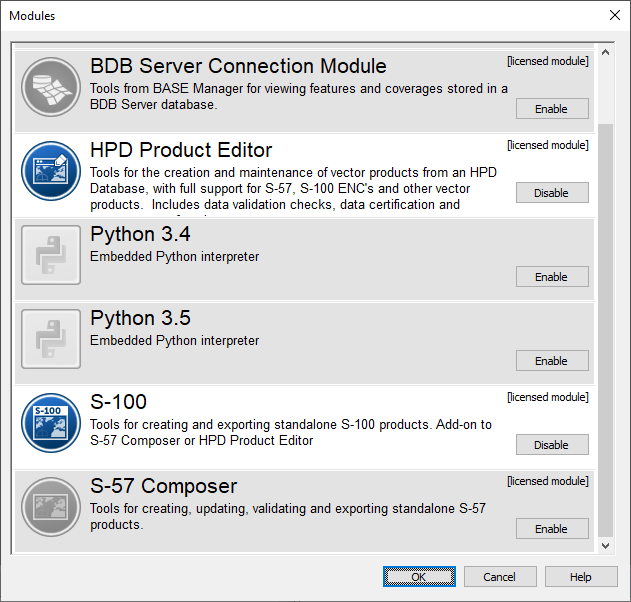
Below is an example of the dialog box opened from the Modules command, populated with the modules available in HPD Product Editor. The modules listed in this dialog box will differ based on the application from which the command was run.
Procedure
1. Select the Modules command.
The Modules dialog box is displayed.
2. Click Enable to turn on modules or Disable to turn them off.
3. Click OK.
4. Exit from the application then restart it.
The modules you changed will be enabled or disabled. The commands available in the application will be changed to reflect the enabled modules.