 CARIS HPD Paper Chart Editor
 CARIS HPD Paper Chart Editor
CARIS HPD Source Editor
CARIS HPD Paper Chart Composer
Menu | Select > Annotations |
Select annotations or annotation components.
Related commands:
• | • |
Interface
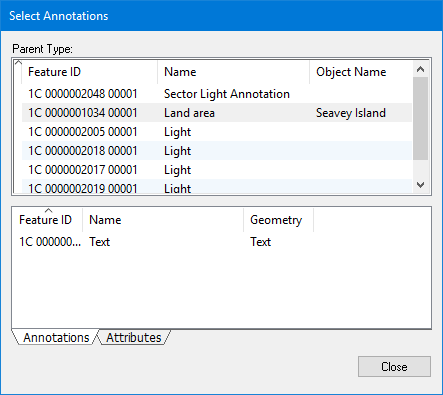
All annotations in the workspace are displayed in the Parent Type list. The list at the bottom displays either the components of selected annotations or the attributes of the annotation, depending on which tab is selected.
Procedure
1. Select the Select Annotations command.
The Select Annotations dialog box is displayed
Add features to the selection or create a new selection as follows:
2. Right-click on a feature in the Parent Type box and select from the pop‑up menu.
Menu | Description |
|---|---|
Add to Selection From | • All Annotation Components: Add all components from the selected annotation to the existing selection. • This Annotation Component: Add the currently selected component to the existing selection. • Annotations of the Annotation Component: Add all annotations of the selected annotation to the existing selection. |
Create Selection From | • All Annotation Components: Create a new selection containing all components from the selected annotation. • This Annotation Component: Create a new selection containing the currently selected component. • Annotations of the Annotation Component: Create a new selection containing all annotations of the selected annotation. |
3. Right-click on a feature in the Annotations tab and select from the pop‑up menu:
Menu | Description |
|---|---|
Add Annotation to Selection | Add the selected annotation to the existing selection. |
Create Selection from Annotation Component | Create a new selection containing the selected annotation component. |