 CARIS HPD Source Editor
 CARIS HPD Source Editor
CARIS HPD Paper Chart Editor
CARIS HPD Product Editor
Tool |
|
Pop-up | Reply to Marker (Marker window) |
Add new information to an existing marker.
The Reply option can replace features associated with a marker with other features or append additional features to a marker.
Available only from the Markers window.
Related commands:
• • • • • • • • • | • • • • • • • • |
Interface
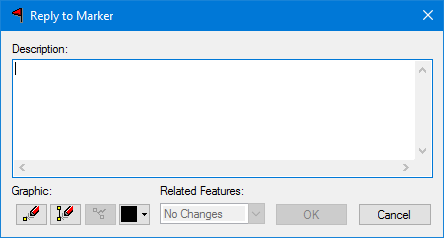
Option | Description |
|---|---|
Description | Information to describe the marker and the changes made to it. |
Graphic | Graphic commands are: Digitize Point Graphic: Add a point graphic to identify the marker. 1. Click in the Display window to position the point. Digitize Line Graphic: Add a point graphic to identify the marker. 1. Right-click in the Display window and select a digitizing tool. 2. Digitize the marker. 3. Press <Enter>, <End>, or <Home> to complete the graphic. Reset Graphic: Erase any or all of the graphic. Change Colour: Change the colour of the marker graphic. 1. Select a colour from the colour picker. |
Related Features | Add or remove related features. 1. Select from the list: • No Changes: Keep the marker properties as is. • Replace with Selection: Replace a feature (or features) associated with a marker with selected features. • Add to Selection: Append additional features to a marker. |
Procedure
1. Select the feature or features.
2. In the Markers window, select a marker.
3. Select the Reply to Marker tool.
The Reply to Marker dialog box is displayed
4. Set any necessary options.
5. Click OK.
The changes are displayed in the Marker Details window.


