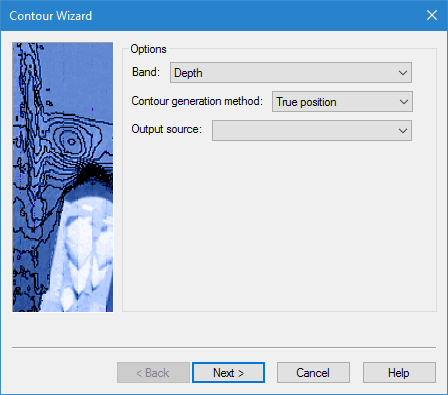
Here you specify the input and output settings for the contours, and the contour generation method.
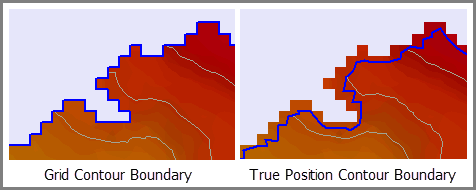
The contour generation method defines how the contour boundaries will be created. The options available in the list are depend on the selected source data.
• For a TIN layer, this option is disabled because the contour boundaries will automatically be built using the points in the TIN.
• For a band without true position data, contour boundaries can only be generated using the outer edges of the grid cells. In this case, Grid will be the only option in the list.
• For a band with true position data, contour boundaries can be created using either the true positions for the data, or the outer edges of the grid cells. In this case, True Position and Grid will both be available in the list.
Interface
Option | Description |
|---|---|
Band | The band of the source surface that will be used as the input height source for creating the contours. The options available are based on the bands present in the source surface. Select from the list. |
Contour generation method | The Contour generation method with which to create the contour lines. Select from the list. |
Output source | The feature layer that will be used to store the contour objects. The list will contain all currently open feature layers. Select from the list. |
Procedure
1. Select a band to use as the height source.
2. Select an option from the Contour generation method list.
3. Select a feature layer the Output layer list.
4. Click Next to go to the next step in the wizard.