 CARIS HPD Paper Chart Editor
 CARIS HPD Paper Chart Editor
CARIS HPD Product Editor
CARIS HPD Source Editor
CARIS S-57 Composer
CARIS Paper Chart Composer
Menu | File > Print Setup |
Set the defaults used for printing.
If you change the paper size or change to a printer that cannot handle large sheets of paper, part of the view may not print because portions are outside the printable boundaries of the current page. |
Related commands:
• |
Interface
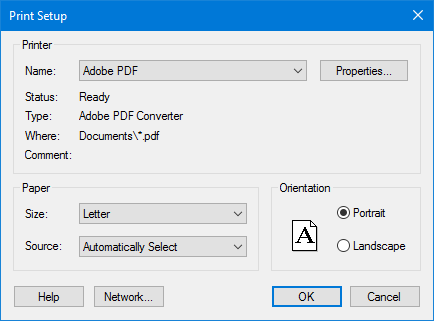
Option | Description |
|---|---|
Printer | Name: The printer to use. Select from the list. The Status, Type, Where, and Comment fields are read-only. |
Paper | Size: The paper size. Select from the list. Source: The printer tray containing the paper. Select from the list. |
Orientation | The print orientation (landscape or portrait) is determined by the LAYOUT attribute for the sheet in the Attributes window. This attribute overrides the orientation selection in the Print dialog box. To change print orientation, select Landscape or Portrait as the LAYOUT attribute before printing. Select one: • Portrait: Vertical • Landscape: Horizontal. |
Command buttons:
Button | Description |
|---|---|
Properties | Set properties of the selected printer. |
Network | Select a network connection and a printer on the network. |
Procedure
1. Select the Print Setup command.
The Print Setup dialog box is displayed.
2. Set any necessary options.
3. Click OK.