 CARIS HPD Product Editor
 CARIS HPD Product Editor
CARIS HPD Source Editor
CARIS S-57 Composer
CARIS Paper Chart Composer
Menu | File > Export > Selection > To GML |
Menu | File > Export > Selection > To KML |
Menu | File > Export >Selection > To Formatted ASCII |
Export to one of the following file types:
• GML: (.gml) Geographic Markup Language. A schema file (.xsd) is also created. It defines the type of elements that can be used and the relationships between different elements.
• KML: (.kml) Keyhole Markup Language
• Formatted ASCII: (.ascii)
A mapping file can be applied to convert features from one data format to another.
Related commands:
• • • • | • • • |
Interface
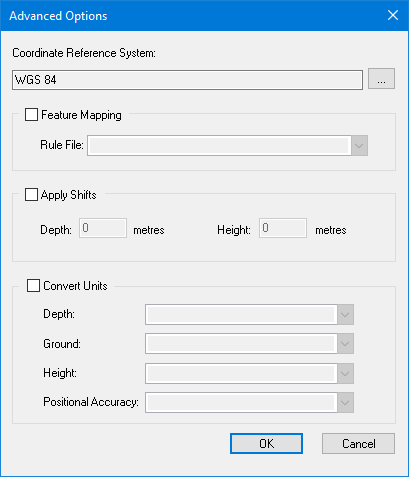
Option | Description |
|---|---|
Coordinate Reference System | The reference system for the output file. Click browse (...) to display the Select Coordinate Reference System dialog box. |
Feature Mapping | On: Apply a mapping file to convert from one format to another. Select the mapping file from the Rule File list. Off: No mapping file is applied. |
Apply Shifts | On: Apply depth or height shifts to attributes with sounding or vertical datum types. Type the shift value in metres. • Depth: Type a plus sign (+) in front of the value to make it deeper or a minus (-) sign to make it shallower. • Height: Type a plus sign (+) in front of the value to make it higher or a minus (-) sign to make it shorter. Off: No shifts are applied. |
Convert Units | On: Convert from one unit of measurement to another. Select the units for the output file as appropriate from the following options: • Depth • Ground • Height • Positional Accuracy Off: Do not convert measurement units. |
Procedure
1. Select one or more features.
2. Select the appropriate Export Selection to command.
The Save As dialog box is displayed.
3. Select a folder and type a file name.
4. Click Save.
The Advanced Options dialog box is displayed.
You can enable any or all of these options or none at all.
5. Set any necessary options.
6. Click OK.
The features are exported.