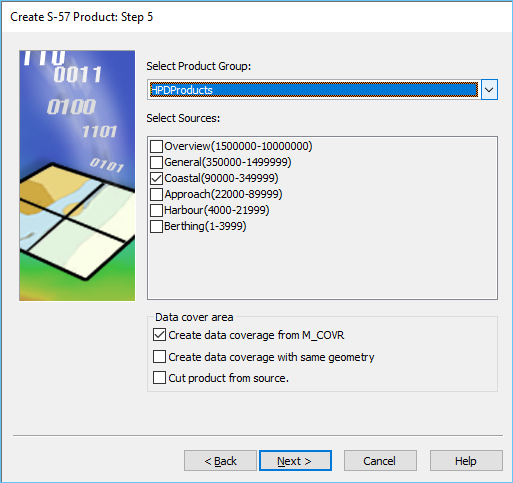
This step is only displayed if you are creating an HPD database product. |
Product group and sources of data.
Interface
Option | Description |
|---|---|
Select Product Group | The group to which the product belongs. Select from the list. |
Select Sources | The source or usage containing the data. Enable as many as necessary. |
Data cover area | The method of populating the product with data. You can select either Create data coverage from M_COVR or Create data coverage with same geometry, but not both. If one option is checked, the other option is unchecked. • Create data coverage from M_COVR: • On: Default selection. Create a product with data cover area from the M_COVR features in the S-57 dataset file. Product-specific M_COVR features with CATCOV=2 will be created automatically. The Cut product from source selection is now enabled. • Off: The product is not created with data cover area from the M_COVR features in the S-57 dataset file. • Create data coverage with same geometry: • On: Create a product with data cover area with the same geometry as source. The Cut product from source selection is now enabled. • Off: The product is not created with data cover area with the same geometry as source. • Cut product from source: • On: The product is populated with source data from within the defined spatial extent. • Off: The product is not populated with source data. |
Procedure
1. Set any necessary options.
2. Click Next.