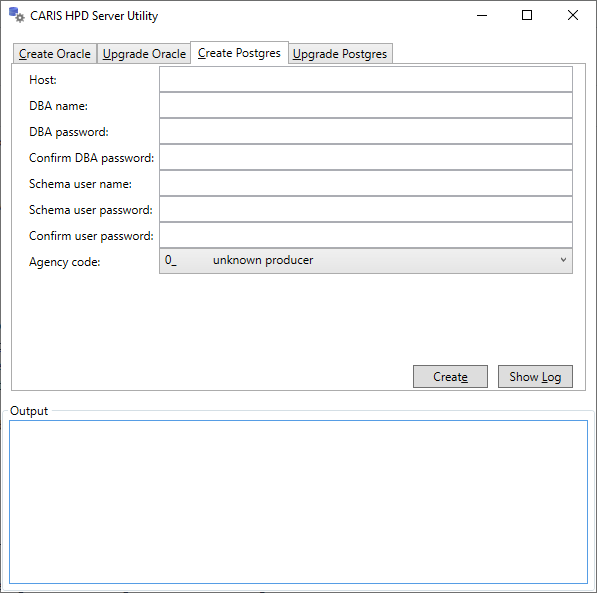
The HPD Server Utility creates and updates schemas.
1. From the Start menu, select CARIS > HPD Server Utility > <version>.
The HPD Server Utility is displayed.
The Oracle tabs are shown only if you have an Oracle client installed. |
2. Select the Create Postgres tab.
3. Enter the parameters in the following table.
Parameter | Description |
Host | Location of the database where the new schema is stored: • Database is on the same computer: Enter localhost. • Database is on another compute: Enter the computer name. |
DBA name | Database name. The default is postgres. |
DBA password | Database password. The default is admin. |
Confirm DBA password | Re-enter the DBA password to confirm it. |
Schema user name | Name of the new HPD schema owner. The name is case-insensitive. You cannot create two schema owners that have the same name, regardless of case. When you log in to HPD, Postgres does a case-insensitive match on the user name. Note: When logging in to HPD or PSQL, the case of the user name and password must match the case used in the Server Utility. |
Schema user password | Password for the schema owner to access the database. The password is case-sensitive. Any user can change the password of any other user if they know the existing password. To change the password, you must first re-enter the existing password. |
Confirm user password | Re-enter the Schema user password to confirm it. |
Agency code | Hydrographic agency code. Select a code from the drop-down list. |
When logging in to HPD or PSQL, the case of the PostgreSQL schema user name and password must match the case used in the Server Utility – that is, they are case-sensitive. |
4. Click Create.
Information is reported in the Output section of the Server Utility. A log file is also created.
5. [Optional] Click Show Log to view a log file of the schema creation process.