Menu | Create >Layer By> Feature Type (Layers window) |
Tool |
|
Menu | Create >Layer By> Feature Type (Layers window) |
Tool |
|
Create layers according to feature type. This could be used to select all features of a specific type.
You can further filter the new layer using any of these related commands:
• Create Layer by Attribute Value
• Create Layer by Feature Acronym
• Create Layer by Feature Object ID
• Create Layer by Unique Feature Acronyms
Procedure
1. Select a layer.
2. Select the Create Layer by Feature Type command.
The Create by Feature Type dialog box is displayed.
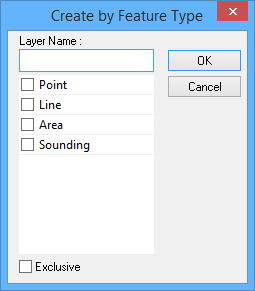
Option | Description |
Layer Name | A name for the layer. Type in the box. |
Select the feature type | Enable one or more feature types. |
Exclusive | Off: The filter will select only the features that meet the criteria. On: The filter will select all features except those that meet the criteria. |
3. Select one or more feature types.
4. [Optional] Enable Exclusive.
5. Click OK.
A layer containing the features that meet the criteria is created.
