CARIS HPD Paper Chart Editor
 CARIS HPD Paper Chart Editor
Pop-up | Add Chart to Page (Object Browser) |
Charts are added to pages that are already inserted into an Atlas. Charts can be either of the following type:
• Index charts: These charts show the location of charts within a geographic area covered by the current Atlas.
• Nautical charts: These charts make up the body of the book and provide navigational information to marine chart users.
Both chart types are database charts that are created and maintained in PCE.
Related commands
• • • | • • • |
Procedure
1. Select an Atlas page layer in the Object Browser
2. Select Add Charts to Atlas command.
The Select Product dialog box is displayed. The dialog box lists all charts in the schema.
3. Select a chart and click OK.
The chart is added to the Atlas book.
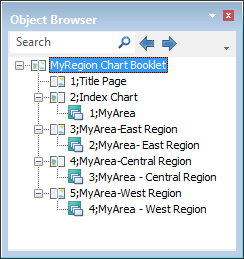
A group of charts in an Atlas book is shown below.