CARIS HPD Paper Chart Editor
 CARIS HPD Paper Chart Editor
CARIS Paper Chart Composer
Menu | Edit > Alignment > Spread Evenly Across |
Tool |
|
Menu | Edit > Alignment > Spread Evenly Down |
Tool |
|
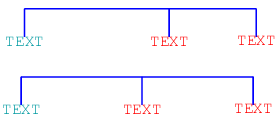
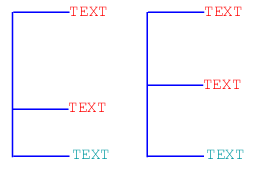
Arrange two or more selected features equidistant from each other. Spacing is measured from the centre of one feature to the centre of the next. The spread is calculated from distances between features.
Alignment commands are applied mostly to reposition text. However, you can align and space any selected features (for example, graphics or text blocks).
Commands can be applied sequentially. For example, apply the Align Top command and then apply the Spread Evenly Down command.
See the table for more information.
Command | Description |
|---|---|
Spread Evenly Across | Spread two or more features across equally (as measured from the centre of each feature). For example, three text features are selected. The blue line shows distance from one feature to the other.
|
Spread Evenly Down | Spread three or more features equally (as measured from the centre of each feature). For example, three text features are selected. When the command is applied, the distances between centres is equal.
|
Related commands:
• | • |
Procedure
1. Select two or more features.
2. Select an Align Spread command.
The distance from the centre of one feature to another is the same.