 CARIS HPD Paper Chart Editor
 CARIS HPD Paper Chart Editor
These commands are available only when the Raster Chart Module is active. |
Menu | Raster > Certify Raster Set > Submit |
Menu | Raster > Certify Raster Set > Accept |
Menu | Raster > Certify Raster Set > Verify |
Menu | Raster > Certify Raster Set > Reject |
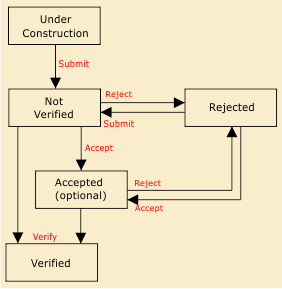
Certification assigns a status to the entire raster set. This status indicates that data has been examined and is found acceptable or unacceptable. The current status is displayed in the Properties window when a raster is selected.
Certification can be applied only to a raster set and cannot be applied to a raster layer or to an area of a raster layer. |
An example of the certification process is shown below. The certification status settings are shown inside the boxes. Certification commands are shown in red.
Related commands:
• • | • • |
Procedure
1. Select a Raster Set layer.
2. Select a certification command.
A message indicates if the changes have been successfully applied.