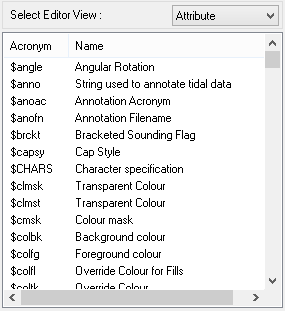
Feature attributes in a dictionary can be viewed and minor modifications can be made to attributes in hpdObjects.
1. Select a dictionary from the list.
2. Select Attributes from the Select Editor View list.
A list of attributes in the selected dictionary is displayed.
3. Select an attribute.
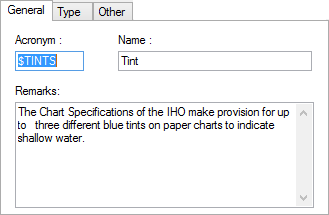
Information on the selected acronym is displayed in the tabs on the right side of the editor:
• General contains basic information about the acronym.
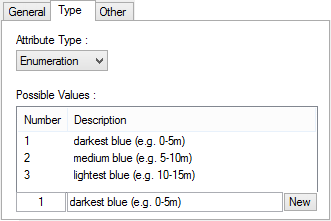
• Type contains the category of acronym.
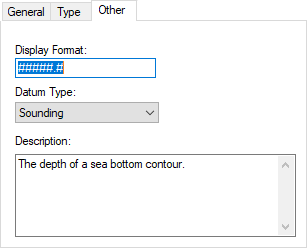
• Other contains formatting information.
4. Change any necessary values in all tabs.
5. If the Attribute Type is Enumerated or List, click None to display the fields for entering values.
6. Click Apply to save the modifications or click Restore to retrieve the previous settings.
General
Option | Description |
|---|---|
Acronym | The feature attribute acronym. |
Name | A brief description of the attribute. |
Remarks | Additional information about the attribute. |
Type
Option | Description |
|---|---|
Attribute Type | A list of attribute types: • Alphanumeric: A combination of numbers and characters to represent an attribute value. • Date: A data value recorded as YYYYMMDD • Enumeration: A numeric value used to represent a list value. Only one enumerated value can be assigned to an attribute. • Float: A numeric value that uses a decimal point. For example, #.### means three places to the right of the decimal point. • Integer: A numeric value. For example, 1. • List: A list of values. More than one value can be assigned to an attribute. • Raster: n external image file that can be assigned to an attribute. • String: A combination of alphanumeric characters to describe an attribute. • Text: An external text file. Do not change the Attribute Type value. |
Possible Values | Numeric values for enumeration or list attributes with descriptions of the values. To enter new values: 1. Click New The Number and Description fields are cleared of value. 2. Type a new number. 3. Type a description. 4. Click Apply. The value is added to the enumerated or list attribute. |
The attribute type that is displayed is determined by the selected attribute.
Other
Option | Description |
|---|---|
Display Format | Set how the a floating point attribute value is displayed in HPD. For example, if the format is |
Datum Type | Set the datum associated with the selected attribute. |
Description | Type some general information about the attribute. |