 CARIS HPD Product Editor
 CARIS HPD Product Editor
CARIS HPD Source Editor
Menu | File > New > HPD Workspace |
Tool |
|
Key | <Ctrl+N> |
A workspace can be created from an existing workspace, from a backdrop file, or from scratch.
Related commands:
• | • |
Interface
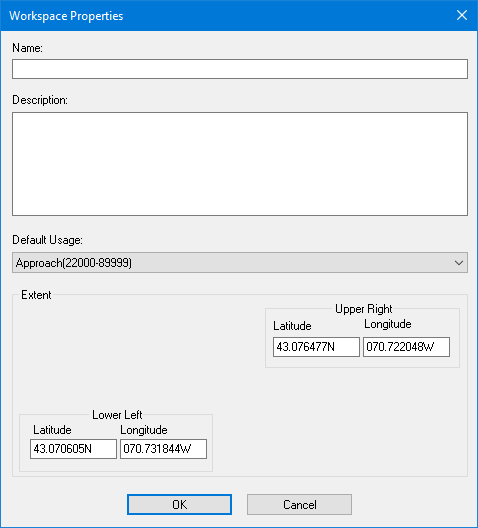
Option | Description |
|---|---|
Name | A meaningful name for the workspace. Type in the box. |
Description | A brief description of the area covered by the workspace. Type in the box. |
Default Usage | The default usage for workspace data. Select from the list usages defined in the database. |
Workspace Extent | The corners of the area. • Lower Left • Upper Right If you have a file open, these fields will contain the extents of the data in the Display window. If no HPD project is open, the fields will be blank and you will have to type the coordinates. |
Procedure
1. [Optional] Open an existing workspace or a backdrop file and zoom to the area you want to include in the new workspace.
The selected area will be used as the new workspace extent.
2. Select the New Workspace command.
The Workspace Properties dialog box is displayed.
3. From Default Usage, select a usage.
4. Type a Name for the workspace
5. Type a Description.
6. If no workspace or file is open, type the coordinates.
7. Click OK.
A message is displayed.
8. Click OK.
The workspace is created.
