 CARIS HPD Paper Chart Editor
 CARIS HPD Paper Chart Editor
CARIS HPD Product Editor
CARIS HPD Source Editor
Menu | File > Open > HPD Workspace |
Tool |
|
Connect to an HPD database and open a workspace and usage. The product type (ENC, AML, GML, or Tiled Raster product) that can be created in the editor is determined by the catalogue and profile that are selected when opening the workspace.
Only features that are certified as Verified in Source Editor can be displayed in Product Editor. |
Related commands:
• | • |
Interface
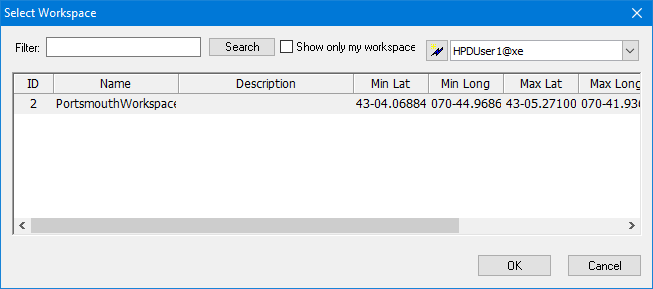
Option | Description |
|---|---|
Filter | List only workspaces containing the specified string. You can use a wildcard character ( • • • |
Show only my workspaces | On: Only your workspaces will be listed. Off: All available workspaces will be listed. |
Connect | Connect to a different schema. 1. Click connect ( 2. Log into the database. Switch between users: 1. Select from the list. |
[list of workspaces] | List of workspaces that meet your filter criteria. The geographic extents of the workspace are listed using the current display units settings. |
Procedure
1. Select the Open Workspace command.
2. If the database dialog box is displayed, type your Username and Password or enable Use Windows credentials.
The Select Workspace dialog box is displayed.
3. Define any necessary filters.
4. Select a workspace.
5. Click OK.
The Select Project dialog box is displayed (see “Open HPD Project” on page 820). This lists only projects associated with the workspace.

 )
)