Dynamic cartography provides a means to automate the cartographic presentation of geographic features in paper charts. It provides greater user control over how features are drawn in a paper chart portrayal and allows for greater flexibility when editing data.
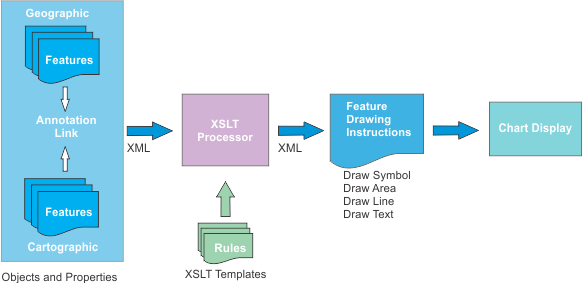
Dynamic cartography links geographic features to cartographic features and incorporates simple or complex instructions to draw the cartographic features. The cartographic feature display overrides the geographic feature display but the geographic features remain.
Instructions are read from XSLT templates. These templates can be modified and re-applied. Cartographic rendering will then automatically adjust to the updated instructions without having to undo previous cartographic edits.
How dynamic cartography works is shown below.
In summary, cartographic features can be compared to real-time annotations. When the chart is drawn, the system replaces the original geographic features with their annotations. These can be edited individually using user-defined templates. See Examples.
The following table lists the differences between standard cartography and dynamic cartography.
Category | Standard Cartography | Dynamic Cartography |
|---|---|---|
Feature display | Features are directly digitized on the panel or source usage. Feature display is determined by lookup tables and assigned attribute values. | An individual geographic feature is paired with an annotation feature. This annotation uses display instructions that replace the original depiction. Attributes of the geographic feature are employed by the annotation to obtain the desired graphic rendering. Each cartographic annotation can be edited individually. |
Drawing instructions | Drawing instructions are read exclusively from lookup tables. Lookup tables are organized by feature type (area, line, point, text). Any change to an instruction in the lookup table is applied to all features in the portrayal and chart using that instruction. | Drawing instructions for cartographic annotations are managed from XSLT templates. Templates are organized according to feature. If no template is found then standard feature lookup tables are applied. |
Feature modification | Editing is applied directly to a feature’s spatial representation and attributes. When editing is completed, the certification status of the feature is set to Under Construction. Changes in source must be applied to all related features. Alternatively, chart-specific features can be added directly to the chart and replace the original feature with the updated graphic depiction. The original feature needs to be masked. | Editing is applied through the Edit Cartography command only to the cartographic annotation. The original feature is not changed and its certification status is unchanged. |
Advantages of dynamic cartography
• Automation: Templates can be applied to all instances when the same graphical depiction is needed. For example, a sector light can contain graphical properties that are specific to that type of light.
• Customization: You can control the type of changes and the extent of changes on various components of a feature.
• Standardization: If a group of features need updating, all that is required is to change the template and all affected features are updated automatically with minimal or no intervention.
Requirements
The following settings are required for dynamic cartography:
• The chart or workspace portrayal must be set to Sample INT1 Dynamic Cartography.
• Features to which dynamic cartography can be applied must be listed in the dynamicFeatures.xml file.
• XSLT templates for processing features must be available.
HPD includes a set of dynamic cartography XML and XSLT files for demonstration purposes. These are located in C:\Program Files\CARIS\HPD\<version>\system\PCEConfig\xslconfig.
You are not limited to those features or templates only. You can expand what is currently available by adding custom templates and including new or existing features.