Conditional symbolization is a method of dynamic cartography that reads attributes from one feature to determine how another feature is symbolized.
For example, a chart contains a MAGVAR area. When a compass rose is inserted into the area – the RYRMGV (reference year), VALACM (annual change), and VALMAG (value) attributes for the compass rose are read from the MAGVAR feature and the rose is symbolized accordingly. If the MAGVAR attributes are changed, then the compass rose is dynamically updated according to the revised values.
Conditional symbolization requires the following files.
Portrayal Control File
The INT1 section of the portrayalcontrol.xml contains a <ConditionalProcedureAnnotationFiles/> tag that points to the folder that contains the rules for drawing the feature. The tag points to the folder where the rules are contained. See below
<ConditionalProcedureAnnotationFiles Directory="%PCEConfig%\ConditionalAnnotations"/> |
In this example, the tag is pointing to the Conditional Annotations folder in PCEConfig. This is the folder that contains file with rules for conditional symbolization.
Points Lookup Table
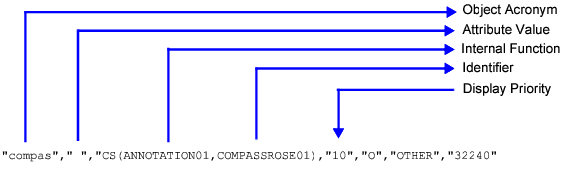
The psymrefs.dic file contains the drawing instruction for the feature. The entry for a compass rose feature is shown below.
• "compas" is the feature acronym for compass rose.
• The field that is normally reserved for attributes is left empty because attribute are read from the conditional procedure file.
• ANNOTATION01 in "CS(ANNOTATION01, COMPASSROSE01)" is the internal procedure that is used to draw the compass rose.
• COMPASSROSE01 in "CS(ANNOTATION01, COMPASSROSE01)" is the identifier for annotation rules to draw the compass rose.
• "10" is the display priority.