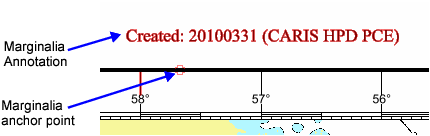
Chart marginalia are annotations located along the border of a panel. Information can include chart number and edition, update and publication details, and references to other charts and documents.
Marginalia can be any of the following:
• Point-justified text
• Chart attribute values
• Text from a file
• TIFF images
• Symbols.
Marginalia is inserted into a chart through the Create > Marginalia command in Paper Chart Editor.
When the command is used, marginalia is positioned along the border at anchor points. In this example, a marginalia text annotation is associated with an anchor point.
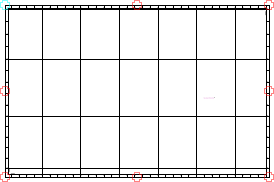
By default, all borders contain eight anchor points as shown here.
Marginalia are linked to anchor points through three interacting files.