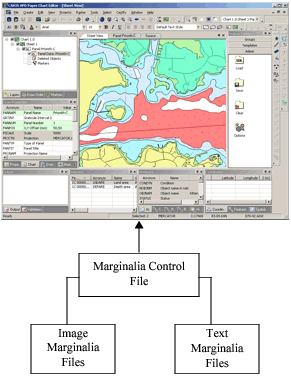
This diagram shows how the marginalia files work together to display marginalia annotations in Paper Chart Editor.
The files are described here.
File Name | Description |
|---|---|
Marginalia Control File: marginaliacontrol.xml | The marginalia control file lists the marginalia rules and associated text and image files for each rule. |
Marginalia Text Annotation Files: SampleMarginalia-Chart.xml SampleMarginalia-INTchart.xml | Marginalia text annotation files link cartographic symbols or text to anchor points. The files define: • Anchor point to which a marginalia annotation is associated • Annotation type (symbol, text, block text, or chart attribute) • Special formatting information (font type, text value, position, etc.). NOTE: For block text, formatting in the text file override attributes in the annotaton file. |
Marginalia Image Annotation Files: SampleMarginalia-ChartImage.xml SampleMarginalia-INTchart-Image.xml | Marginalia image annotation files link images to anchor points. The files also define: • Anchor point to which a marginalia annotation is associated • Annotation type (image) • Special formatting information (attribute colour, position, etc.). |
All files are located in C:\Program Files\CARIS\HPD\<version>\ system\PCEConfig\annotations.
The location and name of the marginalia control file can be accessed by selecting the Marginalia Control File environment setting in the Files and Folders section of the Options dialog box.
Block text or images that are used for marginalia are stored, by default, in C:\Program Files\CARIS\HPD\<version>\system\PCEConfig\marginaliafiles.
The folder name and location is referenced from the Marginalia Data Files environment setting in the Files and Folders section of the Options dialog box.
You can modify an existing marginalia file or create custom files, but the these conventions must be followed:
• All custom files must be use the same syntax as the files included in the installation.
• A custom marginalia control file must be referenced by the Marginalia Control File environment variable
• Block text and images must be located in the folder referenced by the Marginalia Data Files environment setting.
• Marginalia files are saved in UTF-8 (Unicode) format. Other formats cannot be used.
• Attribute and value references in marginalia annotation files are case-sensitive.