The ObjectMappingFileSequenceToExecute type mapping file is a single rule file that allows multiple mapping rule files to be run in sequence or in parallel.
This file is available when creating and updating vector products. Raster files are not supported.
This file is currently supported for the following commands:
This rule file states which mapping files to run. Each referenced file is applied in the order specified in the rule file. Rule files that are not in the usual locations can be executed using the RelativePath attribute.
The rule file also states whether the file is being converted or edited:
• ExecuteConversionMapping: Execute a mapping rule file to convert from the source map to the destination map (for example, convert from S-57 to S-101). This routine can be nested. For nested routines, the source will always map to a temporary map, with the temporary map from the last nested mapping becoming the source for the next nested mapping. After all nested mappings are executed, the last temporary map will be copied to the destination map.
• ExecuteEditMapping: Execute a mapping rule file to edit the destination map (for example, assign scamin or create parent/child relationships). This cannot be nested, but it can be called within an ExecuteConversionMapping routine.
Messages logged to the Output window are consistent with any other mapping. They list the mapping progress as well as any errors, warnings or output messages.
ObjectMappingFileSequenceToExecute has the following attributes.
Tag
Attributes
Status
Version
Default is 1.0, which can be incremented as necessary.
Mandatory
Name
Unique identification for this mapping rule file. The name is displayed in all dialog boxes that support this type of mapping rule file, such as Import Selected Objects and Change Selection.
Mandatory
RelativePath
Relative path to the mapping rule file being executed, if the file is not in the usual Rules folders. Files referenced by this attribute are loaded with all other rule files when HPD is opened, but are only available for ObjectMappingFileSequenceToExecute type mapping files.
Optional
FromType
Type of source map to which this mapping rule file applies. This is required when executing object-to-object mapping, to ensure that the FromType and the source map are compatible.
Mandatory
ToType
Type of destination map to which this mapping rule file applies. This is required when executing object-to-object mapping, to ensure that the ToType and the destination map are compatible.
Only GO mapping types are currently supported.
Mandatory
RequireAll
Boolean value (true/false). If no value is given, false is assumed.
If RequireAll = true, the mapping is cancelled if any feature cannot be mapped or edited because an error occurred during the mapping. Subsequent mappings will not be applied. All editing will be halted and and no edits will be applied to the destination map.
If RequireAll = false and there are errors during any of the mappings, subsequent mappings will continue to be executed as much as possible.
Optional
Name (execution routine)
Name of the object-to-object mapping file to execute. The file must be available in the application. See Overview for more information.
Mandatory
KeepFOIDs (execution routine)
Boolean value (true/false).
If KeepFOIDs = true, all FOIDs are maintained when mapping, including features that are modified to have a different feature code. This may result in duplicate FOIDs in the destination map.
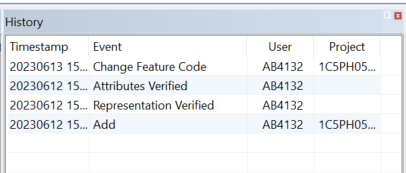
• If a FOID is kept but its feature code is changed, this event is shown in the History window as Change Feature Code.
• If a FOID is changed, the event is shown as Add.
If KeepFOIDs = false or this attribute is not set, new FOIDs will be assigned.
Optional
ReportFeaturesNotMapped
Boolean value (true/false). If no value is given, false is assumed.
Indicates if unmapped features are to be reported when using the ExecuteConversionMapping and ExecuteEditMapping rules:
• True: All unmapped features are flagged and reported.
• False: Unmapped features are not reported.
The default is not to report, because multiple mappings are usually being executed from an ObjectMappingFileSequenceToExecute type mapping file, and this file intentionally maps only a subset of all objects.
Optional
In this example, a sample mapping rule file using ObjectMappingFileSequenceToExecute is shown with two conversion rules and one edit rule. The mappings operate in parallel.
<?xml version="1.0" encoding="UTF-8"?>
<ObjectMappingFileSequenceToExecute Version="1.0" Name="Convert buildings and beacons" FromType="GO" ToType="GO" RequireAll="true">
In this example, the nested rules are sequential and a temporary map is used for each intermediate mapping. At the end of the last mapping, the last temporary destination map is copied to the actual destination map.
<?xml version="1.0" encoding="UTF-8"?>
<ObjectMappingFileSequenceToExecute Version="1.0" Name="Convert and cleanup" FromType="GO" ToType="GO" RequireAll="false">
In this example, the top-level mapping is run in parallel and operates directly from the source to the destination. The nested mapping is sequential and uses an intermediate temporary map between each nested mapping.
<?xml version="1.0" encoding="UTF-8"?>
<ObjectMappingFileSequenceToExecute Version="1.0" Name=" Convert buildings and beacons" FromType="GO" ToType="GO" RequireAll="false">
In this example, two editing routines operate in parallel. Because there is no nesting, temporary maps are not needed and the rules operate directly on the destination map.
In this example, the referenced mapping file for ExecuteConversionMapping is located in the sub-folder conversionMappings, and the mapping file for ExecuteEditMapping is in the sub-folder editMappings.
<?xml version="1.0" encoding="UTF-8"?>
<ObjectMappingFileSequenceToExecute Version="1.0" Name="Convert buildings and beacons" FromType="GO" ToType="GO" RequireAll="false">
In this example, unmapped features are reported when running the S-57 3.1 to S-101 1.2.0 XSL conversion mapping. However, unmapped features are not reported when running the S-57 to S-101 XSL mapping. .
<?xml version="1.0" encoding="UTF-8"?>
<ObjectMappingFileSequenceToExecute Version="1.0" Name="Convert buildings and beacons" FromType="GO" ToType="GO" RequireAll="false">
<ExecuteConversionMapping Name="S-57 3.1 to S-101 1.2.0 XSL" RelativePath="S-57_to_S-101_XSL" KeepFOIDs="true" ReportFeaturesNotMapped="true"/>
<ExecuteConversionMapping Name="S-57 to S-101 XSL" RelativePath="S-57_to_S-101_XSL" KeepFOIDs="true" ReportFeaturesNotMapped="false"/>