
Publications Module is a CARIS HPD application for building and managing non-chart publications, such as
• Notices to mariners
• List of lights
• List of buoys and fog signals
• List of radio signals/radio aids
• List of wrecks
• Navigational warnings.
Additional Publications Module functionality is available through the Atlas commands in Paper Chart Editor. You must activate the Publications Module to make Atlas commands available in Paper Chart Editor. |
Data from HPD products can be imported to a publication:
• Paper charts: Features in a paper chart panel can be selected and loaded into notice instructions.
• GML products: Features in a GML (Geographic Markup Language) product can be loaded into list records.
Publications Module can be integrated into your organization’s data-management workflow as shown below.
The black lines demonstrate how data can be processed through HPD and Publications Module.
Notices are sometimes produced under tight deadlines. In this case, you can enter information directly into Publications Module and bypass Source Editor. This workflow is shown by the red lines. Later, you can integrate the information using a standard HPD workflow (that is, import data into Source Editor and perform certification).
These are suggested workflows. As you become comfortable with Publications Module, you can establish one that fits with the structures and processes of your organization.
An outline of the Publications Module structure is shown below.
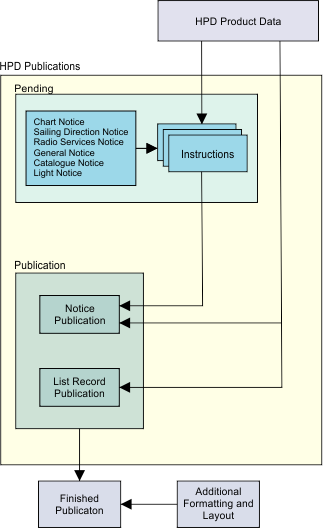
Notices can be created and stored in one of two locations:
• Pending Notices layers, and later moved to the Publication section
• Publications section.
Pending Notices layers are useful repositories if notices require multiple reviewers or a formal quality-control process before publication.
List records are created directly in the Publication section. Both list records and notices are later exported to an XML (Extensible Markup Language) file. A user-defined style sheet is applied during export to format the file for final publication.