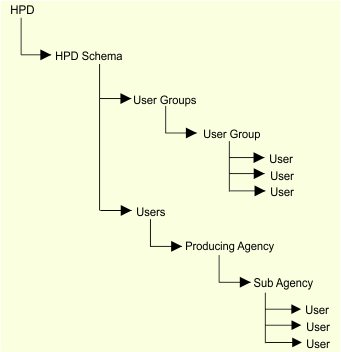
HPD users and user groups must be organized in a specific hierarchy. This hierarchy is read by ImportLDAP process when importing the LDAP node.
This table describes the nodes in the structure.
Node | Description |
|---|---|
HPD | Top node in the directory service. More than one structure can be defined under this node, but each structure must belong to separate schemas. |
HPD Schema | Node for the HPD schema. A schema can have only one structure. |
User Groups | Node for all user groups in the structure. More than one group can belong under this node. The organizational unit must always be named User Groups. |
User Group | Individual user group nodes contains users that belong to that group. Note that user groups cannot be contained within other groups. |
Users | Each user that belongs to a user group. The users in the group must assigned to a sub agency listed in the structure. Users can be assigned to multiple groups but can only be a single schema. |
Users | Node for defining HPD users with access to the HPD schema. The organizational unit must always be named Users. |
Producing Agency | Agency code. The agency code must match the code in the HPD schema. |
Sub Agency | Sub Agency defines the users that are assigned to that sub agency. Note: sub agencies cannot be created in directory services – all sub agencies must be created in HPD. |
User | All users that belong to that sub agency. A user can belong only to one sub agency. |
Example
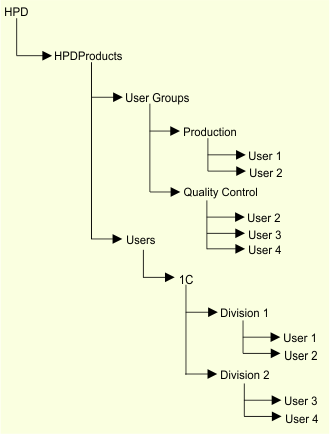
In this example:
• The top-level node is HPD. The node contains one schema, HPDProducts. Remember, more than one schema can be contained under the top-level node.
• HPDProducts contains nodes for user groups (User Groups) and users (Users)
• User Groups contains two groups: Production and Quality Control. Production has two users and Quality Control has three users. User 2 is in both Production and Quality Control.
• Users contains the agency code for CARIS (1C) and the sub-agencies Division 1 and Division 2. The agency code is defined in the schema and the sub-agencies are created using Admin Tools.
• All users that listed with the sub-agencies have access to that HPD schema.