 CARIS HPD Paper Chart Editor
 CARIS HPD Paper Chart Editor
Menu | Tools > Switch Usage |
Switch the source of a panel to a different usage. Features from the substitute usage are linked to the panel.
This command complements a process where source usages are re-compiled or re-organized. Over time, some HPD users may decide to change the way features are compiled onto source usages and this command can be used to re-assign usages to charts.
When usages are switched the following conditions apply:
• Features that common to both the panel and usage are displayed in the panel.
• Features that are in the panel but not in the usage are moved to the Deleted Objects layer.
Features on the Deleted Objects layer can be reintegrated into the panel using the Undelete Features command.
Additional panel changes can be applied using the Compare Panel to Source command. For example, new or modified features can be integrated from source into the panel.
Related commands
• • | • |
Interface
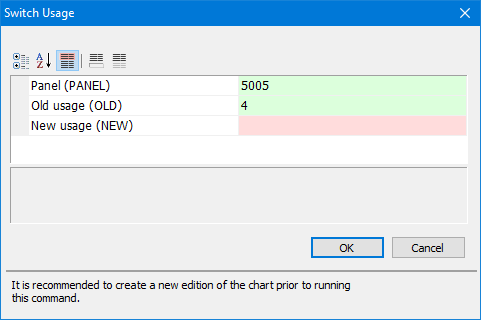
Property | Description |
|---|---|
Panel | The panel in which the features from the new usage are going to be linked. |
Old usage | Usage from which panel features were originally obtained. |
New Usage | The new source usage to which the panel features will now be linked. |
Procedure
1. Select a panel layer.
2. Select the Switch Usages command.
The Switch Usages dialog box is displayed.
3. Select a New usage from the list.
4. Click OK.
The time from the start of the process to its completion is displayed in the Output window.
5. Select the Save command.
6. [Optional] Select features on the Deleted Objects layer and use the Undelete Feature command to reintegrate the features into the panel.
7. Select the Compare Panel to Source command.
8. [Optional] Integrate features in the Compare Panel to Source layers into the panel.