 CARIS HPD Paper Chart Editor
 CARIS HPD Paper Chart Editor
CARIS HPD Product Editor
CARIS HPD Source Editor
CARIS S-57 Composer
CARIS Paper Chart Composer
Menu | Select > Features By > Attribute Value |
Tool |
|
Select features based on their attribute values.
Related commands:
• • • • • • • • • • • • | • • • • • • • • • • • • |
Interface
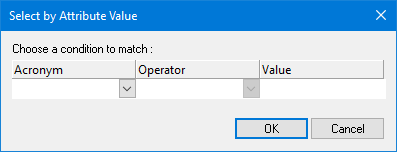
Option | Description |
|---|---|
Acronym | An attribute acronym. Select from the list. |
Operator | Available operators depend on the selected acronym. Select from the list: |
Value | The type of value depends on the selected acronym. Type values or select from a list as required. Depth and height values are displayed according to the precision settings using the Options command. |
Layer Name | [create layer only] A name for the layer. Type in the box. |
Procedure
1. Select a layer.
2. Select the Select by Attribute Value command.
The Select by Attribute Value dialog box is displayed.
3. Select an attribute, operator, and value.
4. Click OK.
Features that meet the search criteria are selected.
