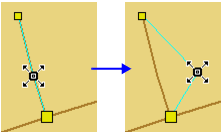
Move one or more vertices on an edge.
Related commands:
Procedure
1. Select the feature.
2. Select the Edit Feature command.
3. Position the cursor over a vertex.
The cursor changes (  ).
).
4. Press and hold the mouse button.
The vertex turns red.
5. Drag the vertex to a new position.
6. Release the mouse button.
7. Refresh the display.