 CARIS HPD Paper Chart Editor
 CARIS HPD Paper Chart Editor
CARIS HPD Product Editor
CARIS HPD Source Editor
CARIS S-57 Composer
CARIS Paper Chart Composer
Tools |
|
Pop-up | Line Digitizer > Spline |
Pop-up | Area Digitizer > Spline |
A spline is a curved line that is defined by control points and a control line. HPD splines are b-splines, which use control points of equal weight to shape the curve. Control points rarely reside on the resulting curve.
The Digitize Spline command can be used when you create a line or area.
Related commands:
• | • |
Procedure
1. Choose the Spline command.
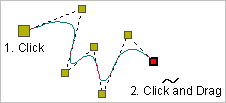
2. Click once at the location of the first control point (1).
3. Do one of the following:
• Click at the location of the second point.
• Press and hold the mouse button, drag the second point to its location then release the button.
4. Continue until all points are added.
5. Select the End Line or Close Line command.
Close line joins the first point in the line to the last point.
The new curved line feature is created.
