 CARIS HPD Paper Chart Editor
 CARIS HPD Paper Chart Editor
CARIS HPD Product Editor
CARIS HPD Source Editor
CARIS S-57 Composer
CARIS Paper Chart Composer
Tools |
|
Pop-up | Line Digitizer > Squared Line |
Pop-up | Area Digitizer > Squared Line |
A squared line is a point to point line where the angles at the vertices can be forced to multiples of 45º.
The Digitize Squared Line command can be used when you create a line, area, or panel.
Related commands:
• • | • |
Procedure
1. Select the Squared Line command.
2. Click once at the location of the first point (1).
3. Press and hold the mouse button and drag the pointer.
When the angle approaches 45º or 90º or other multiple, the pointer will snap.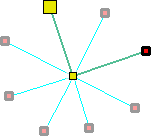
4. Release the pointer when second line segment is the right length and the two line segments form the correct angle.
If you do not want a multiple of 45º at that vertex, you can release the pointer between snaps.
5. Repeat for each additional vertex.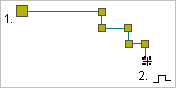
6. Select the End Line or Close Line command.
Close line joins the first point in the line to the last point. If you are creating an area or a panel, you can use either commend because the line is automatically closed.
The new line feature is created.
