 CARIS HPD Source Editor
 CARIS HPD Source Editor
Menu | File > Export > Markers |
Export markers. They are saved in two files, a HOB file (.hob) and a marker file (.mrk),
The markers that are exported are determined by the marker filter settings.
Markers may have attachments such as text or graphic files. When exported, the path and name of the attachment is included but not the actual file. You will have to separately include these files after using this command.
Related commands:
• • • • • • • • • | • • • • • • • • |
Interface
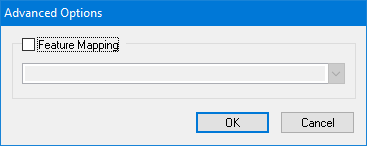
Option | Description |
|---|---|
Feature Mapping | On: Feature mapping options will be applied to the exported markers. Select a mapping option from the list. Off: No feature mapping options will be applied to the exported markers. |
Procedure
1. Select the Export Markers command.
The Save As dialog box is displayed.
2. Choose a location for the HOB file and the associated marker file.
3. Type a name for the HOB file.
4. Click Save.
The Advanced Options dialog box is displayed.
5. If necessary, enable feature mapping and select a mapping option.
6. Click OK.
The markers are exported. Results are shown in the Output window.