 CARIS HPD Source Editor
 CARIS HPD Source Editor
Pop-up | Advanced Attributes (Markers window) |
Tool |
|
Add or modify advanced attributes of a selected marker.
Available only from the Markers window.
Related commands:
• • • • • • • • • | • • • • • • • • |
Interface
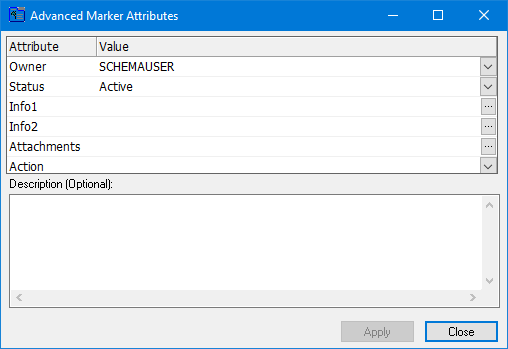
Attribute | Description |
|---|---|
Owner | The creator of the marker. Select a user name from the list. |
Status | The state of the marker. Choose from: • active • dismissed • closed Select from the list. |
nfo1 | A general field where any alphanumeric information can be entered. Type in the box. |
Info2 | A general field where any alphanumeric information can be entered. Type in the box. |
Attachments | The file path for text or graphics associated with the marker. Multiple paths are separated by a semi-colon. |
Action | The measures that the chart producer must take to correct the chart information so that it matches the survey information. Choose from: • Add • Delete • Modify Select from the list. |
Procedure
1. Select a marker.
2. Select the Advanced Marker Attributes command.
The Advanced Marker Attributes dialog box is displayed.
3. Add or modify values for any of the attributes.
4. [Optional] Type a description.
The new attribute values are set.
