 CARIS HPD Paper Chart Editor
 CARIS HPD Paper Chart Editor
CARIS HPD Product Editor
CARIS HPD Source Editor
Menu | File > New > Layer By > Marker |
Tool |
|
Pop-up | Add Layer > Marker (Layers window) |
Create a layer based on marker types.
Related commands:
• • • • • • • • • • • • • • • • • • | • • • • • • • • • • • • • • • • |
Interface
Option | Description |
|---|---|
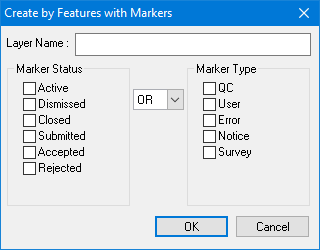
Layer Name | A name for the layer. Type in the box. Create Layer by Marker command only. |
Marker Status Marker Type | To filter on status or type only: • Select one or more items from the appropriate list. To filter on both status and type: • Select one or more items from the Marker Status list. • Select AND or OR. • Select one or more items from the Marker Type list. If you select AND, both conditions must be met. If you select OR, one condition must be met. |
Procedure
1. Select the Select by Marker or Create Layer by Marker command.
The Create by Features with Markers dialog box is displayed.
2. Select the marker statuses and types.
3. Click OK.
A layer is created.
